A senior safety checklist for aging in place is a set of app-based routines: scheduled daily check-ins, missed-check-in alerts sent to real people, medication reminders, GPS location sharing, and a documented emergency contact network. The single action to take right now is to enable daily check-ins in a safety app like Well-Check and add at least one escalation contact who knows what to do if you miss one.
TL;DR:
- Enabling daily check-ins with at least one escalation contact significantly reduces the risk of unnoticed emergencies or missed alerts.
- Setting consistent check-in times, testing alerts monthly, and updating contact and medical information ensure system reliability and accuracy.
- Home modifications such as grab bars, non-slip mats, and proper lighting can prevent the majority of falls before they happen.
- Building a clear escalation plan with defined human roles and emergency triggers is crucial to respond promptly after missed check-ins.
- Integrating reminders for hydration, nutrition, and social interaction into the safety routine helps address broader health risks beyond falls.
Table of Contents
- The Full Senior Safety Checklist You Can Set Up Today
- How to Set Up the App: A Step-by-Step Configuration Checklist
- Build an Escalation Plan You Can Copy Word for Word
- Testing and Maintenance: Keep the System Reliable
- Home Safety Modifications That Reduce Risk Around the House
- Fall Prevention Strategies That Go Beyond the Bathroom
- Fire Safety and Evacuation Plans Built for Seniors Living Alone
- Cognitive Health Monitoring and Support
- Nutrition and Hydration Reminders That Fit Into the Daily Routine
- Social Interaction and Mental Health Check-Ins
- Why This Checklist Matters More Than It Looks
- Try Well-Check: The App Built Around This Exact Checklist
- Sources
The Full Senior Safety Checklist You Can Set Up Today
The best version of this checklist lives on a phone, not a refrigerator magnet. Paper lists get lost. App settings get enforced automatically, every single day, whether anyone remembers to check or not.
Here’s what a complete app-based setup actually includes:
- A daily check-in window. Pick a consistent time, say 9:00 AM, with a 30-minute grace period before anything escalates. Consistency matters more than the exact hour; the app learns the pattern and so does the senior.
- A one-tap confirmation. “I’m okay” should take one tap, not a login screen and a menu. If it’s harder than answering a text, it won’t get used.
- Missed-check-in alerts to named people. When the grace period expires, the app should fire off notifications automatically instead of waiting for someone to notice a missed phone call.
- Medication reminders tied to the same schedule. A missed pill reminder stacked on top of a missed check-in is a stronger signal than either alone.
- GPS location sharing, kept on but battery-conscious, so a caregiver can locate someone quickly during an actual emergency rather than guessing.
- A pre-written alert message that includes the essentials before anyone has to think under pressure.
That last item deserves its own template. Something like:
“[Name] has missed their scheduled check-in as of [time]. Address: [full address]. Spare key location: [location]. Known medical conditions: [list]. Primary doctor: [name/number]. Please call [name] first; if unreachable within 15 minutes, contact [secondary contact] or call emergency services.”
Fill that in once, save it in the app, and it’s ready the moment it’s needed.
A daily check-in app workflow typically bundles the scheduled notification, the grace period, and the automatic contact alert into one system, which replaces the old habit of a family member calling every night “just to check.” Phone calls get missed, forgotten, or skipped when someone’s tired. A scheduled digital check-in doesn’t skip.
Consider also:
- Setting quiet hours so notifications don’t wake anyone at 3 AM for a non-urgent reminder.
- Reviewing who’s on the contact list every few months, since phone numbers and relationships change.
- Confirming the app works on both WiFi and cellular data, in case one drops out.
Pro Tip: Write the alert template in plain, boring language. Under stress, nobody wants to parse a paragraph. “Call the neighbor, key is under the flowerpot” beats a formal sentence every time.
How to Set Up the App: A Step-by-Step Configuration Checklist
Setup takes one sitting if you follow it in order. Here’s the sequence that avoids the most common gaps.
- Install the app and grant every permission it asks for, especially notifications, location, and background activity. A check-in app that can’t send push notifications is just a to-do list nobody sees.
- Confirm delivery works both ways. Send a test push notification and, if the app supports it, a test SMS. Some carriers filter app notifications; catch that now, not during an actual emergency.
- Create the named check-in with its grace period, then add every emergency contact and send each one a test alert so you know it actually lands in their inbox or phone.
- Enter medical and access notes into the alert template: conditions, allergies, medications, spare key location, and the primary doctor’s contact information.
- Turn on medication reminders and match their timing to when doses are actually taken, not a generic morning/evening default.
- Test GPS sharing by opening the map view on a caregiver’s phone and confirming the location updates.
- Set a charging routine. A phone at 4% battery overnight defeats the entire system. Charging next to the bed, every night, no exceptions.
- Check for app updates monthly. Old app versions sometimes stop delivering notifications silently, with no error message at all.
Pro Tip: Do this setup together, in person if possible. A senior who helped configure their own contacts is far more likely to actually use the app daily than one who was handed a finished setup they didn’t understand.
Build an Escalation Plan You Can Copy Word for Word
Most families never write down what happens after a missed check-in. They assume someone will “figure it out.” That assumption is the weak link. A documented escalation plan that combines a check-in system with clear human roles handles more failure scenarios than either piece alone.
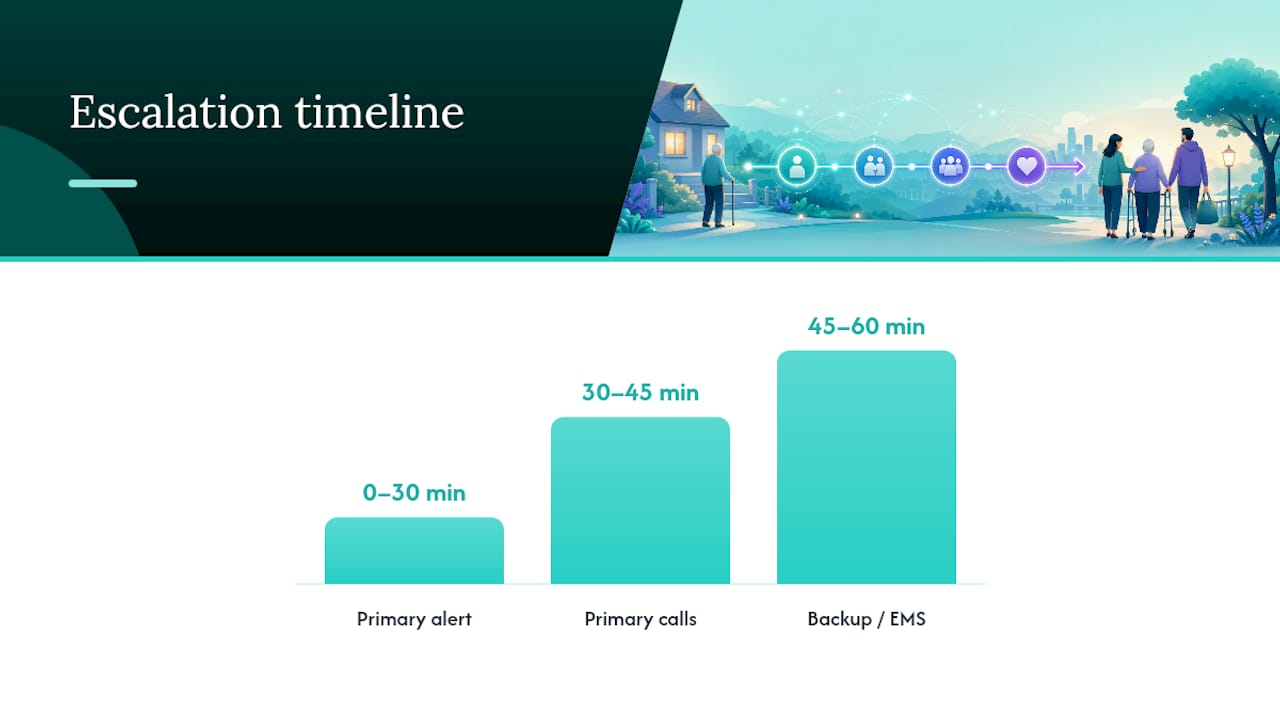
Here’s a workable three-step timeline:
- Minute 0 to 30: Grace period expires with no check-in. The app fires its automatic alert to the primary contact.
- Minute 30 to 45: Primary contact calls the senior directly. If no answer, they call again in five minutes, then move on.
- Minute 45 to 60: Primary contact calls the neighbor or secondary contact, who does a physical check if they’re nearby. No answer and no visual confirmation means the next call is emergency services.
At each step, whoever is calling should have the address, known medical conditions, and spare key location already written down, not something they have to text three people to find.
One rule matters more than the others: decide in advance who has authority to call emergency services without waiting for a family vote. Hesitation costs minutes that matter.
Store the plan in the app’s notes field and as a printed copy taped inside a kitchen cabinet. Redundancy here isn’t overkill, it’s the point.
Pro Tip: Assign backup roles too. If the primary contact is on a plane or asleep in another time zone, the plan needs a name two, not just a shrug.
Testing and Maintenance: Keep the System Reliable
A safety system nobody tests is a safety system nobody can trust. Regular testing catches permission changes, dead batteries, and stale contact information before they matter.
- Weekly: Do a quick check-in test and confirm the alert reaches at least one contact.
- Monthly: Run a simulated missed check-in with a willing family member on the other end, so everyone remembers what the process feels like under mild pressure.
- Quarterly: Review the medication list, current address, spare key location, and app permissions, since phones update their privacy settings without asking.
- As needed: If false alerts start piling up, extend the grace period slightly rather than turning notifications off entirely. Turning them off defeats the whole purpose.
Combining a tested daily check-in with a documented plan closes gaps that either piece would leave open alone.
Home Safety Modifications That Reduce Risk Around the House
The app catches what happens after a fall. These modifications reduce how often one happens in the first place.
Grab bars near the toilet, in the shower, and along entry steps give a stable hand hold exactly where balance tends to fail. Install them at standard height and anchor them into studs, not just drywall.
Non-slip mats belong in the bathroom and kitchen, the two rooms with the most water on the floor. Skip throw rugs in walkways entirely; they’re a leading trip hazard and rarely worth the decoration.
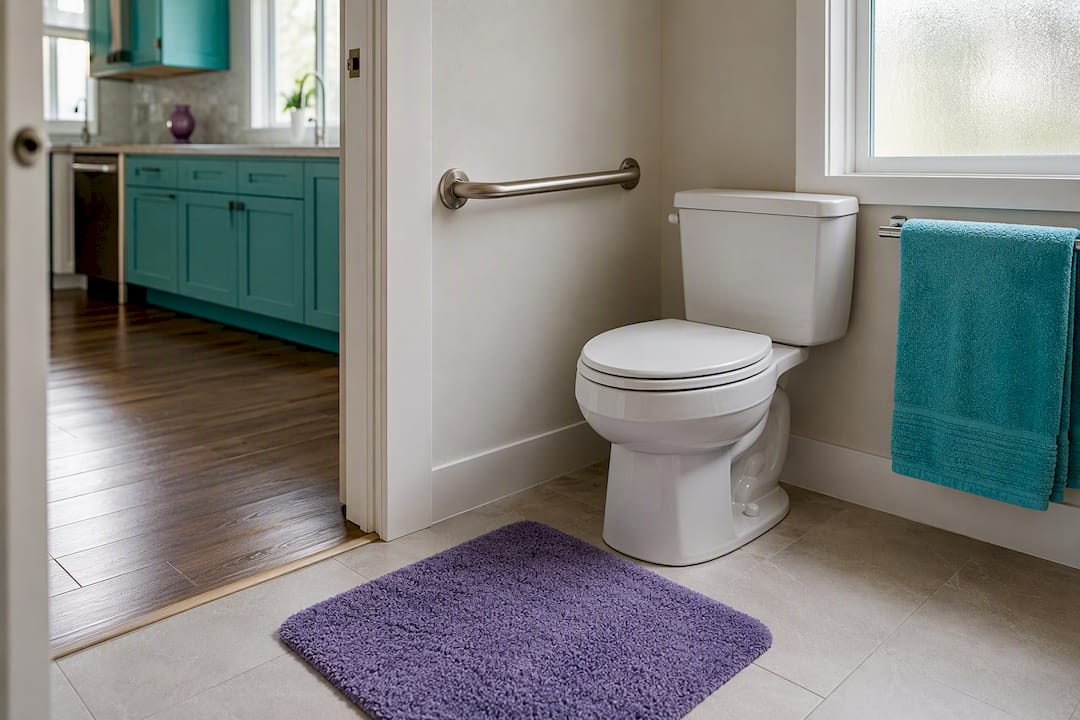
Lighting matters more than most families realize. Motion-sensor night-lights in hallways and bathrooms remove the need to fumble for a switch at 2 AM. Stairwells need lighting at both the top and bottom, not just one end.
A few other fixes worth the weekend:
- Raised toilet seats reduce the strain of sitting and standing.
- Lever-style door handles are easier to operate than round knobs for anyone with arthritis.
- Clear walking paths, at least three feet wide, between furniture.
None of these are expensive. Most cost under $50 and take an afternoon.
Fall Prevention Strategies That Go Beyond the Bathroom
Falls are the single most common reason a senior living alone ends up in the hospital, and prevention works best as a combination of habits, not one fix.
Footwear is an easy first move. Non-slip shoes or slippers with a real sole, worn indoors, cut down on the sock-on-tile slide that catches people off guard.
Strength and balance exercises, even simple ones like standing on one foot while holding a counter, build the stability that prevents a stumble from becoming a fall. Physical therapists often recommend a few minutes a day, not an hour-long routine nobody sticks to.
Vision and medication reviews matter too. Blurry vision from an outdated glasses prescription, or dizziness as a medication side effect, causes more falls than people assume. An annual eye exam and a medication review with a doctor catch both.
A daily check-in system doesn’t prevent the fall itself, but it shrinks the window between when a fall happens and when someone finds out, which is often the difference between a bruise and a much worse outcome.
Fire Safety and Evacuation Plans Built for Seniors Living Alone
A fire plan designed for a 30-year-old doesn’t always work for someone with limited mobility, and that gap gets overlooked constantly.
Smoke detectors need testing monthly, not just when the batteries chirp. For seniors with hearing loss, detectors with strobe lights or bed-shaker attachments exist and are worth the investment.
An evacuation plan should account for how someone actually moves through the home. If stairs are a struggle, the plan needs a ground-floor escape route identified in advance, not improvised during a fire. Keep a phone by the bed for calling emergency services if evacuation isn’t possible.
Practice matters here just like it does with the check-in system. Walking through the escape route once, calmly, in daylight, beats trying to figure it out for the first time in smoke and panic.
Keep a fire extinguisher in the kitchen, rated for the types of fires most likely to start there, and make sure it’s within reach and not expired.
Cognitive Health Monitoring and Support
Cognitive changes creep in slowly, which makes them easy to miss during occasional phone calls but far more visible through daily patterns.
A consistent check-in routine does more than confirm safety. It creates a baseline. A caregiver who sees a senior tap “I’m okay” every morning at 9:00 notices when that pattern shifts, when check-ins start coming late, or when the same simple task suddenly feels harder to complete.
Simple daily habits support cognitive health directly: a consistent sleep schedule, a crossword puzzle, a phone call with a friend, or even sticking to the same daily routine which reduces the mental load of decision-making.
Watch for warning signs during regular contact: repeating the same question within a short conversation, missed medications despite reminders, or confusion about the day or time. None of these are diagnoses. They’re signals worth mentioning to a doctor, and a daily check-in habit is often what surfaces them early enough to matter.
Nutrition and Hydration Reminders That Fit Into the Daily Routine
Dehydration and poor nutrition sneak up on seniors more than most families expect, partly because thirst signals weaken with age.
Building hydration and meal reminders into the same app routine as medication and check-in alerts keeps everything in one place instead of scattered across sticky notes. A midday reminder to drink water, paired with the existing check-in schedule, costs nothing extra to set up.
Simple habits worth reinforcing:
- Keep a water bottle within reach in the main living area, not just the kitchen.
- Set a reminder for each meal, since skipping meals becomes more common when cooking feels like too much effort.
- Watch for signs of dehydration like confusion or dizziness, which are sometimes mistaken for unrelated health issues.
A missed meal reminder alongside a missed check-in adds another layer of signal, similar to how a missed medication reminder paired with a missed check-in raises the urgency to follow up sooner rather than later.
Social Interaction and Mental Health Check-Ins
Isolation is one of the quieter risks of living alone, and it doesn’t show up on a fall risk assessment.
Loneliness affects mood, appetite, sleep, and even how consistently someone remembers to take medication or complete a check-in. A senior who feels forgotten is less likely to engage with any safety routine at all, which makes social connection part of the safety picture, not separate from it.
Scheduling regular calls or visits, even short ones, gives a check-in system emotional weight instead of feeling like just another notification to dismiss. Some families use the daily “I’m okay” tap as a small ritual, a way of saying “I thought about you today” rather than a chore.
Local senior centers, faith communities, and volunteer visitor programs fill gaps that family can’t always cover, especially for seniors whose relatives live far away. A caregiver resource like Ask Rose offers practical guidance for families navigating these day-to-day realities of supporting someone who lives alone.
Why This Checklist Matters More Than It Looks
Most families treat a senior safety checklist like a one-time errand: set it up, forget about it, hope for the best. That’s backwards. The value isn’t in the setup, it’s in the daily repetition. A check-in tapped every morning for a year builds a pattern that reveals problems fast, long before a missed call would.
Roughly 16 million seniors in the U.S. live with some degree of isolation, and most of them aren’t wearing a fall-detection pendant. A daily check-in habit, backed by Well-Check’s missed-alert system, closes a real gap for anyone who doesn’t have that device yet, or doesn’t want one.
Set up one check-in today. Run a test alert before you close the app. That’s the whole first step.
— Brian
Try Well-Check: The App Built Around This Exact Checklist
Every item on this checklist maps directly to a feature inside Well-Check: scheduled daily check-ins with configurable grace periods, automatic missed-check-in alerts to your emergency contact network, medication reminders tied to the same schedule, GPS location sharing, and smart caregiver analysis that spots patterns before a crisis does.
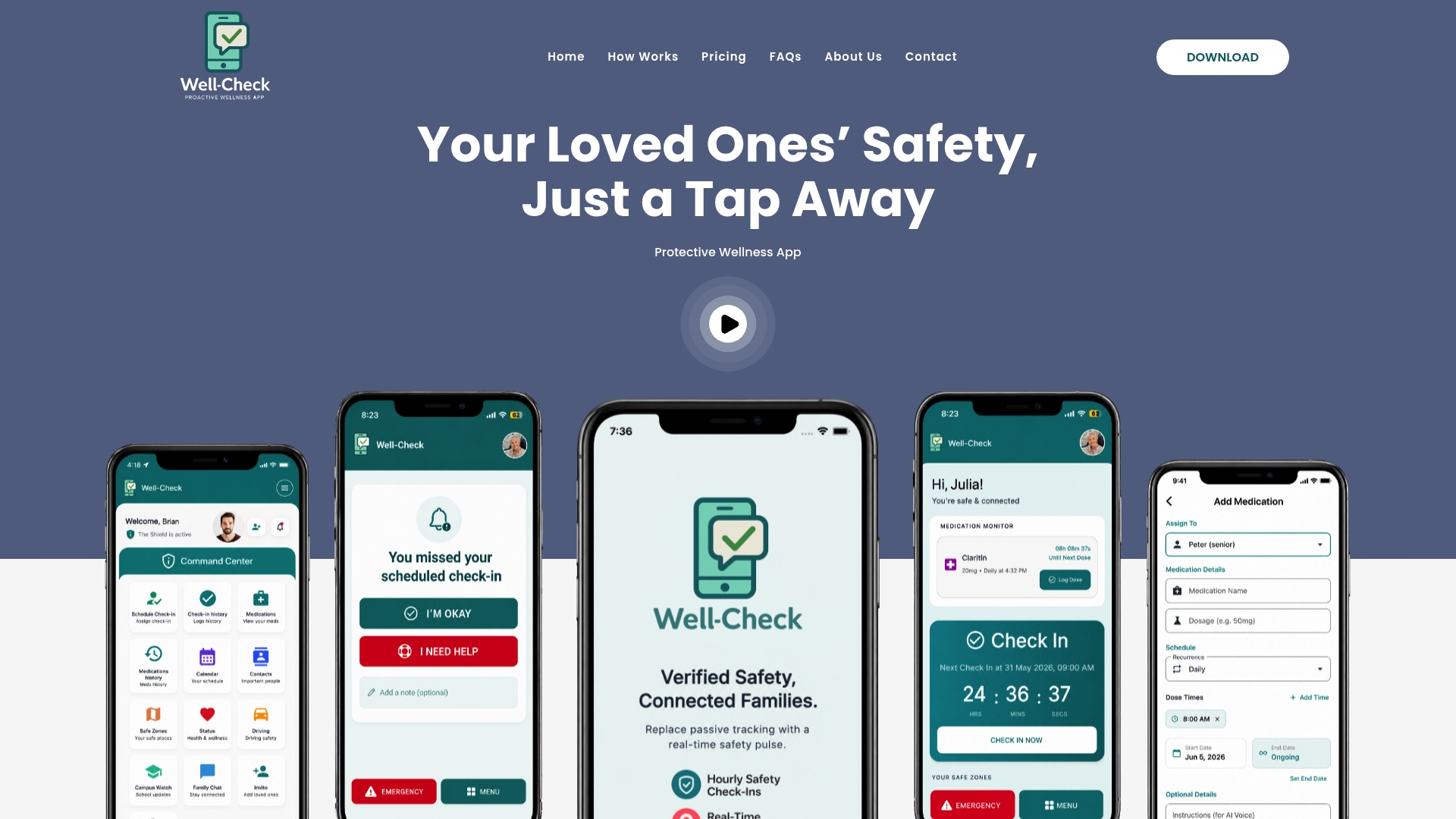
Instead of piecing together a paper checklist, a separate reminder app, and a group text chain for emergencies, Well-Check runs all of it from one interface, with one-tap “I’m okay” confirmations that take less effort than answering a phone call. You can see exactly how the check-in and alert workflow functions on the how Well-Check works page, or go straight to the pricing plans to find the tier that fits your family’s situation. Set up your first check-in today and run a test alert before you need it for real.

[…] you’re setting up a loved one’s phone for the first time, our guide on senior safety checklist walks through the rest of the setup in one sitting, and you can compare Essential and Complete […]
[…] short senior safety checklist can hold all of this in one […]