Yes, when set up right, remote check-in and monitoring apps can turn continuous hands-on watching into exception-based follow-up and give family caregivers measurable relief. Daily check-ins, missed-check alerts, medication reminders, GPS location, and emergency contact networks each remove a piece of the constant-vigilance burden. If you want to see how one of these tools works in practice, Well-Check’s product page walks through the setup in a few minutes.
TL;DR:
- Digital respite tools reduce caregiver burden modestly by replacing routine check-ins with exception-based alerts, but they depend heavily on proper setup and response plans.
- Features like missed-check alerts and GPS tracking improve reaction times to emergencies but require household customization and clear escalation procedures to be effective.
- Technology cannot verify medication adherence or replace clinical care but can help extend independence when combined with traditional respite options like in-home care or adult day programs.
- Ethical and legal concerns, especially around consent and data privacy, require families to establish clear boundaries before deploying monitoring apps.
Table of Contents
- How tech-based respite works: the mechanisms that free caregivers’ time
- What the evidence says: realistic benefits and important limits
- How to choose the right app and set it up so it actually creates respite
- One-page checklist families can use this week
- Respite care beyond apps: in-home, adult day, and residential options
- The emotional weight respite lifts off family caregivers
- Why respite care is harder to access than it should be
- Paying for respite: funding, insurance, and assistance programs
- Legal and ethical questions worth settling before you start
- Finding community support when you need more than an app
- What technology can and can’t fix in caregiving
- How Well-Check maps to the checklist you just built
- Sources
- FAQ
How tech-based respite works: the mechanisms that free caregivers’ time
The core idea behind digital respite is simple: replace constant checking with an alert that fires only when something is wrong. That shift, from continuous supervision to exception-based monitoring, is what actually gives caregivers their time back. A caregiver who used to call twice a day “just to check” can instead wait for the app to tell her something needs attention.
Each feature handles a different piece of that job:
- Daily check-ins let the person confirm they are okay with one tap, which replaces routine phone calls that interrupt both parties’ days.
- Missed-check alerts flag the moments that actually need a response, so caregivers stop scanning for problems that usually aren’t there.
- Medication reminders prompt someone to take a dose at the right time, though they cannot confirm the dose was actually swallowed.
- GPS tracking and emergency contacts cut the time between a fall or wandering episode and a real response, since the right person gets notified immediately instead of after a delay.
Together, these mechanisms improve information flow and a caregiver’s sense of security, according to a review of the mechanisms behind caregiver technology. That review notes these effects only materialize when the tool is customized to the household and paired with a clear plan for who responds to an alert. A working system, not just an installed app, is what produces the relief.
What the evidence says: realistic benefits and important limits
The research on digital caregiver tools is encouraging but modest, and it pays to know exactly what it shows before you build your expectations around it.
A 2024 systematic review and meta-analysis of 14 randomized trials found technology-based interventions produced a small but statistically significant reduction in caregiver-burden scores, with a pooled change of about −0.13 on a 95% confidence interval of −0.25 to −0.00. The reviewers rated the overall evidence quality as moderate, and the trials varied widely in design, so this is a real but modest effect, not a transformation.
On medication tools specifically, a scoping review found reported improvements in adherence and quality of life, but a few studies met the inclusion criteria and their adherence measures varied, showing promising but not conclusive results. That is a promising signal, not a settled finding.
A mixed-methods study of remote activity monitoring in family dementia care found caregivers reported real gains in peace of mind, but adoption only worked when the system was customized to the household and tied to a defined human response pathway. Without a person ready to act on an alert, the alert itself does nothing.
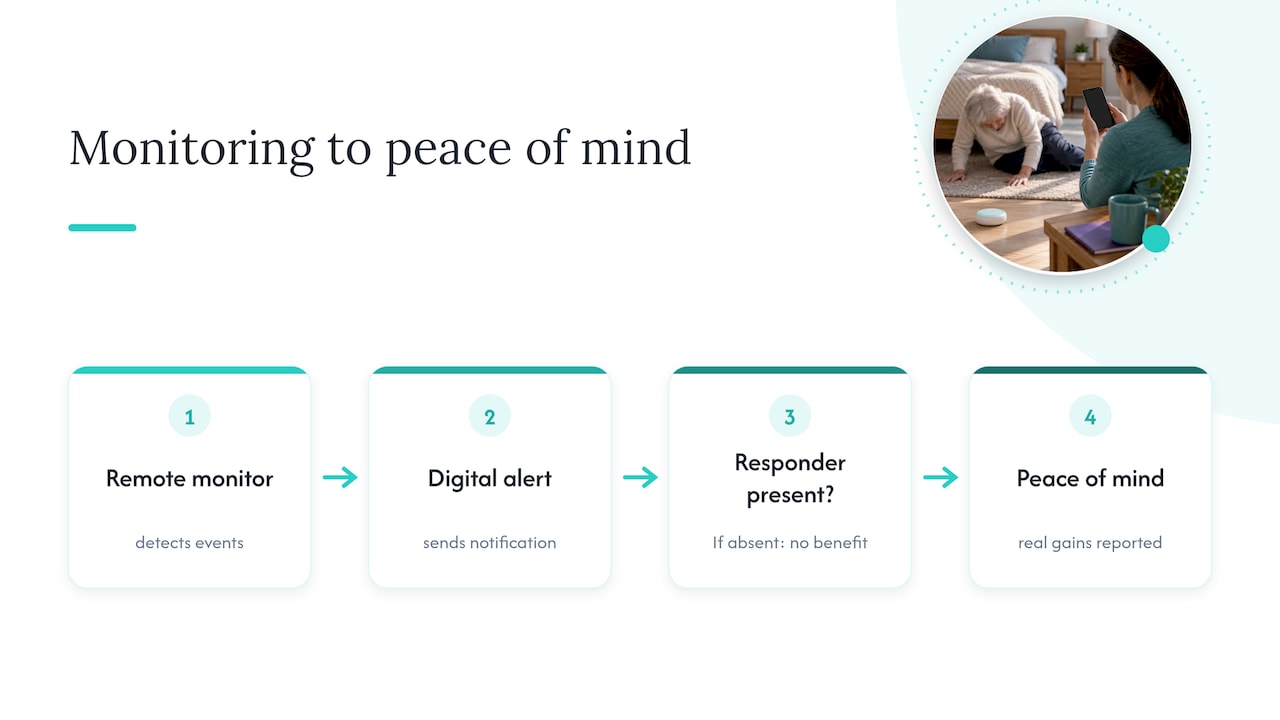
The limits are consistent across this research: apps cannot verify that a pill was swallowed, cannot substitute for clinical care, and cannot help anyone if no one is assigned to respond when they signal trouble.
How to choose the right app and set it up so it actually creates respite
Picking a tool is the easy part. The setup determines whether it actually buys you time back or just becomes one more thing to monitor.
Before you commit, run through this checklist:
- Ease of use for the person being monitored. If check-ins require more than one or two taps, adherence drops fast.
- A shared responder network, so more than one family member can see alerts and step in.
- Clear escalation logic for missed check-ins, meaning the system tells you exactly what happens and when if a check-in is skipped.
- Medication features that prompt reliably, understanding they cannot confirm the dose was taken.
- GPS and privacy controls that let the older adult and family agree on what location data is shared and with whom.
- Battery and connectivity requirements, since a monitoring app that drains a phone by noon defeats its own purpose.
During a free trial or demo, ask directly: who receives an alert first, what happens if that person doesn’t respond, can you test a missed-check scenario before relying on it, who can access the location and check-in history, and what the plan costs after the trial ends. A family guide to remote check-ins is a useful primer if you want to see how these questions play out in practice before you start comparing vendors.
Once you’ve chosen a tool, follow a simple rollout: configure the check-in schedule together with the person using it, run a test missed-check to see the alert fire, name a primary and backup responder, set the medication reminder times, agree on a fallback plan for when the phone dies or the internet drops, and revisit the whole setup after 30 days.
Pro Tip: Run the missed-check test yourself before you rely on it. Skip a check-in on purpose during setup so you know exactly what the alert looks like and how fast it arrives.
One-page checklist families can use this week
Print this out or save it somewhere you’ll actually look at it again.
- Daily: confirm the “I’m okay” check-in went through and the phone is charged.
- Weekly: intentionally miss a check-in to confirm the escalation alert still fires correctly.
- Responders: name a primary and a backup, and test both contact methods, not just the primary.
- Medication: set reminder times, confirm who handles refills, and remember reminders are prompts, not proof anyone took the dose.
- Privacy: review what location data is shared, agree on consent language, and write down who has access.
| Task | Frequency | Who owns it |
|---|---|---|
| Confirm check-in and battery | Daily | Person being monitored |
| Test missed-check escalation | Weekly | Primary responder |
| Review medication reminder accuracy | Weekly | Primary responder |
| Audit location-sharing settings | Monthly | Family decision-maker |
Respite care beyond apps: in-home, adult day, and residential options
Technology handles daily monitoring and communication, but it isn’t the only form of relief available to family caregivers. In-home respite brings a paid or volunteer caregiver into the home for a few hours or overnight, covering meals, supervision, and personal care while the family caregiver steps away. Adult day programs provide structured activity and supervision outside the home, typically for several hours on weekdays, which gives caregivers a predictable block of free time without an overnight commitment. Residential respite places the care recipient in a facility for a short stay, often a few days to a couple of weeks, which is the option most caregivers turn to for a genuine break, such as a vacation or a medical event of their own.
Each type solves a different problem. In-home respite fits daily relief without disrupting routine. Adult day programs fit caregivers who work or need consistent weekday coverage. Residential stays fit situations where the caregiver needs to be fully off duty for an extended period. None of these require the care recipient to relocate permanently, and families often combine two or three types depending on the season or the caregiver’s own needs. A check-in app does not replace any of these; it fills the gaps between them, covering the hours when no other support is present.
The emotional weight respite lifts off family caregivers
The physical tasks of caregiving get most of the attention, but the emotional toll is often what wears caregivers down first. Constant vigilance, the low hum of worry that never fully switches off, and the guilt that surfaces the moment a caregiver considers taking a break for themselves all compound over time. Respite, whether it comes from a scheduled break, a trusted responder network, or simply an alert system that says “everything is fine” without a phone call, interrupts that cycle.
The mixed-methods study of remote activity monitoring found that caregivers who adopted a customized monitoring system with a clear response plan reported real gains in peace of mind, separate from any change in the actual amount of hands-on care they provided. That distinction matters: the relief was psychological as much as practical. Knowing that a problem will surface on its own, rather than needing to be hunted for, lets a caregiver’s mind rest even during hours when they aren’t actively checking in. That kind of relief doesn’t show up in a task list, but it’s often the difference between a caregiver who can sustain the role for years and one who burns out within months.
Why respite care is harder to access than it should be
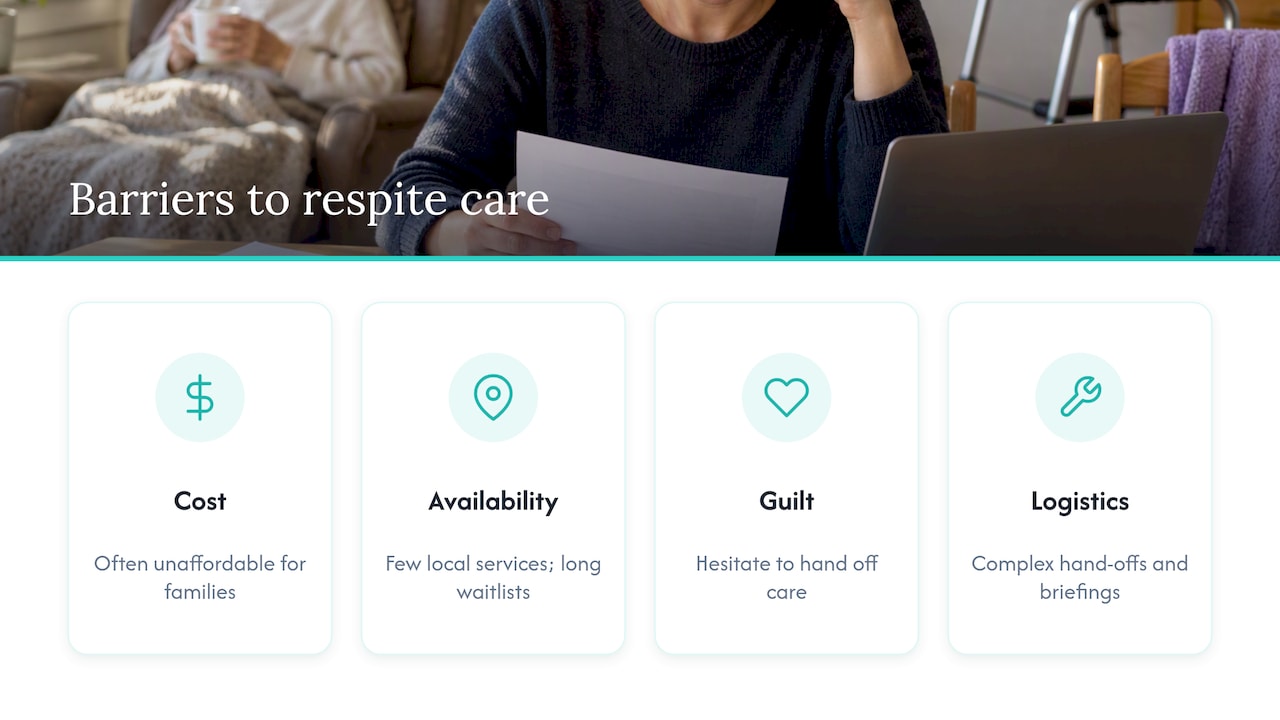
Even caregivers who know they need a break run into real obstacles getting one. Cost is the most obvious: in-home aides, adult day programs, and residential respite stays all carry a price tag that many families weigh against other household expenses. Availability compounds the problem. Rural areas in particular often have few in-home agencies or day programs within a reasonable drive, and waiting lists for residential respite beds can stretch out past the point where the break is still needed.
Guilt is a quieter but equally real barrier. Many caregivers describe hesitating to hand off care, even for a weekend, because they worry it signals they can’t handle the role or that no one else will do it the way they would. Logistics add another layer: coordinating a hand-off, briefing a substitute caregiver on medications and routines, and managing the anxiety of the person receiving care about a change in who’s present all take effort that can feel like more work than staying on duty.
Technology-based tools sidestep some of these barriers by requiring no scheduling, no hand-off, and no travel. A monitoring app runs continuously in the background, which is part of why it has become a first step for caregivers who aren’t ready or able to arrange traditional respite yet. WHO’s guidance on digital healthy ageing notes that digital tools can extend independence and access, provided usability, digital literacy, and privacy are addressed during setup, which is exactly where many families get stuck without guidance.
Paying for respite: funding, insurance, and assistance programs
Cost is often the first question caregivers ask, and the honest answer is that funding sources vary widely by country, program, and the type of respite involved. In-home and residential respite services are frequently paid out of pocket, though many regions offer public assistance programs, tax credits, or subsidized respite grants aimed specifically at family caregivers. Eligibility and coverage rules differ enough by jurisdiction that a caregiver should check the requirements in their own region before assuming coverage exists.
Some health insurance plans cover portions of adult day care or in-home aide services when tied to a documented medical need, though caregivers should confirm current plan documents rather than assume based on a neighbor’s experience or general assumptions about what insurance typically covers. Nonprofit organizations and area agencies on aging in many regions also maintain small grant programs or voucher systems specifically for respite, often with income or diagnosis requirements attached.
Technology-based tools sit at a different price point entirely. A monitoring app is a recurring subscription rather than a service booked by the hour or the day, which makes it easier to budget for consistently, even if it addresses a narrower slice of the caregiving load than an in-home aide or residential stay would.
Legal and ethical questions worth settling before you start
Monitoring someone, even someone you love and are trying to protect, raises real questions about consent and autonomy. An older adult who is cognitively capable has the right to decide how much location tracking or check-in monitoring they’re comfortable with, and that conversation should happen before any app is installed, not after.
Consent becomes more complicated when dementia or another cognitive condition is involved. Families should document who has legal authority to make care decisions, such as a healthcare power of attorney, and be clear about what monitoring is being used for and who can see the data. Well-Check and similar apps let families customize who’s in the emergency contact network, but the ethical responsibility for deciding who gets access still sits with the family, not the software.
There’s also a practical legal point that gets overlooked: a medication reminder or missed-check alert is not a medical record and does not substitute for a clinical care plan. If a caregiver is ever asked to demonstrate that proper care was provided, an app log showing check-ins is supporting context, not proof of medical compliance. Treating it otherwise, especially in a dispute between family members about who is responsible for what, can create problems the app was never designed to solve.
Finding community support when you need more than an app
No app replaces the value of talking to someone who understands what you’re going through. Caregiver support groups, both in-person and online, give family caregivers a place to trade practical advice and process the parts of the role that don’t show up on a checklist, like grief over a parent’s decline or resentment that’s hard to admit to anyone else. Local area agencies on aging, hospital social work departments, and disease-specific nonprofits often maintain directories of these groups and can point caregivers toward respite programs available in their area.
Faith communities and neighborhood networks fill a similar role in many areas, sometimes offering informal check-in help or meal support that a family caregiver would otherwise have to arrange and pay for. National caregiving organizations also publish free guides on topics like managing medication schedules or handling difficult family conversations about care, which pair well with a monitoring app rather than replacing it. A guide to hiring in-home help for medication support is one example of the kind of practical resource worth having on hand alongside any technology you use, since it covers ground an app alone can’t.
The families who sustain caregiving longest tend to combine a few of these supports rather than leaning on just one: a monitoring app for daily reassurance, a support group for the emotional load, and a documented plan for who steps in when either isn’t enough.
What technology can and can’t fix in caregiving
Apps are good at one specific thing: turning constant watching into an alert that fires when something changes. That’s a real and useful shift, but it’s easy to overstate what it means. A missed-check alert tells you something is wrong. It doesn’t tell you why, and it doesn’t send help by itself. That part still depends entirely on a human being who’s paying attention and ready to act.
The mistake I see most often is treating the app as the safety net instead of the trigger for one. The safety net is still the family member, neighbor, or aide who answers when the alert goes off. Well-Check and tools like it are built around that reality: features like missed-check alerts and GPS tracking are only as good as the response plan behind them. Used that way, technology is a genuine tool for respite. Used as a substitute for a plan, it’s just a false sense of security.
— Brian
How Well-Check maps to the checklist you just built
Everything covered above, daily check-ins, missed-check alerts, medication reminders, GPS tracking, and a defined responder network, is exactly what Well-Check is built around. 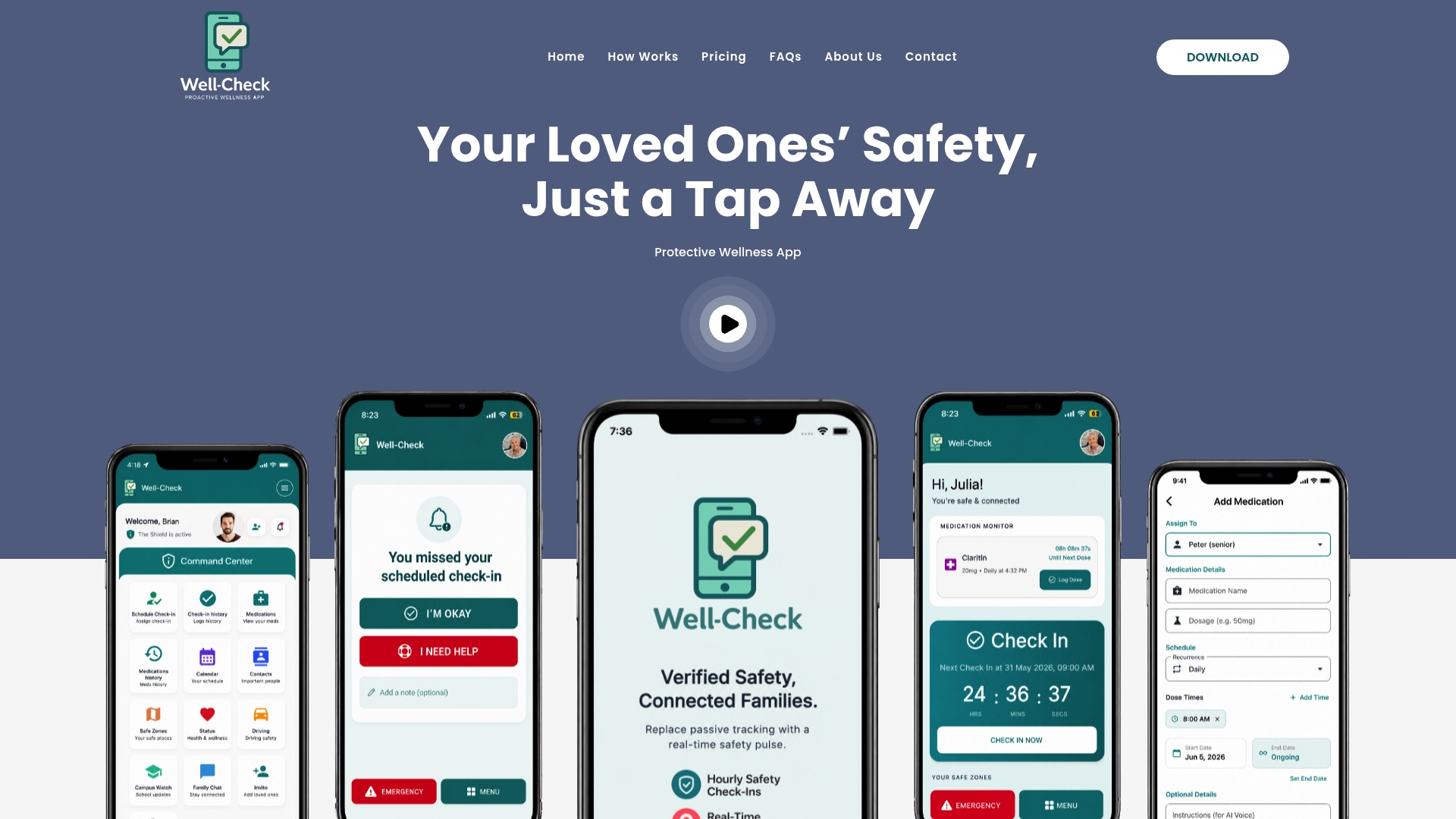
The app includes features such as one-tap check-ins, missed-check alerts to emergency contacts, medication reminders, GPS tracking for safety, caregiver pattern analysis, and quick access to help for urgent situations.
If you’re setting this up for the first time, the Essential plan covers the core check-in and alert features most families need to start, while Complete adds the fuller feature set for households that want GPS and caregiver analysis from day one. Both are detailed on the pricing page, and the how Well-Check works page walks through setup step by step if you want to see the flow before committing.
Sources
- Technology-based interventions on burden of older adults’ informal caregivers: systematic review and meta-analysis
- Promoting healthy ageing in a digital world (WHO Europe, 2024)
FAQ
Can a check-in app really reduce caregiver burnout?
Research suggests a modest but real effect: a 2024 meta-analysis of 14 randomized trials found technology-based interventions produced a small, statistically significant reduction in caregiver-burden scores. The benefit is real but incremental, not a full replacement for other forms of support.
Do medication reminder apps guarantee a dose was taken?
No. Medication reminders prompt someone to take a dose at the right time, but they cannot confirm it was actually swallowed. Treat them as a prompt that may trigger a follow-up call, not as proof of adherence.
What’s the difference between digital respite and traditional respite care?
Digital respite uses check-in and monitoring apps to reduce hands-on supervision through alerts and reminders, while traditional respite involves an in-home aide, adult day program, or residential stay that physically takes over caregiving for a set period. Many families use both, with technology covering daily gaps and traditional respite covering longer breaks.
How much does a caregiver monitoring app cost?
Well-Check offers an Essential plan at $5.99 per month and a Complete plan at $7.99 per month, covering check-ins, alerts, medication reminders, and GPS tracking depending on the plan.
Who should respond when a missed check-in alert fires?
A named primary responder, usually a family member, should be the first contact, with a backup responder assigned in case the primary doesn’t answer. Testing both contacts’ response methods before relying on the system, as noted in research on remote activity monitoring, is what makes the alert actually useful in an emergency.