Google’s own guidance is to dial your local emergency number directly (911 in the US) rather than count on a voice assistant. Google says that automated systems for contacting emergency services are subject to strict legal regulations and are generally not permitted, so what happens when you ask an assistant for help depends on the device, the account and the subscription. For someone who lives alone, the safest setup combines a phone’s built-in emergency features with a person who notices when something is wrong. That is the job of a daily check-in app like Well-Check.
TL;DR
- In an emergency, dial 911 yourself (or the local emergency number outside the US and Canada). Do not rely on a voice assistant as your only route.
- Google smart speakers and displays do not support emergency calls through their standard calling methods. US Google Home Premium subscribers can reach 911 through the Home app instead.
- Pixel phones add Emergency SOS, car crash detection and, on recent models, satellite SOS. Pixel Watch adds its own safety features.
- None of these tell a family member that a parent has gone quiet. A daily check-in with missed-check-in alerts covers that gap.
Table of Contents
- What happens when you ask Google Assistant to call 911
- Emergency SOS on Pixel phones: the faster route
- Pixel Watch: help from the wrist
- Google Home and Nest speakers
- Quick comparison
- The gap every one of these leaves
- How to build a layered setup for someone living alone
- If the phone only lets you make emergency calls
- What has changed recently
- Our perspective
- Well-Check plans
- FAQ
- Sources
What happens when you ask Google Assistant to call 911
Many people assume that saying “Hey Google, call 911” is the same as dialing. Google’s documentation points in a more cautious direction. Its help page on emergency calling across Google products says that in an emergency you should always dial your local emergency number, giving 911 as the example for the US and Canada and 112 for many parts of Europe.
The same page explains why voice and automated routes are treated carefully: rules around systems that contact emergency services are strict, and Google designs its emergency features to comply with them. In practice, that means you should treat a voice command as a convenience that may or may not work on your particular phone, and never as a guarantee.
There is a second practical problem. Wording matters to voice assistants. Asking for an ambulance is not the same request as asking to call 911, and under stress people rarely use the exact phrase. A person who has fallen, is confused or has trouble speaking is the least likely to get the phrasing right.
Why the phone itself is more reliable
When you place or text an emergency call from an Android phone, the phone’s own emergency location service can automatically and securely send your location to emergency services, even if Location Services are turned off. That protection works with the phone’s regular emergency dialer, which is one more reason to use the dialer or a hardware shortcut rather than a chain of voice steps.
Most emergency calls need a cellular or Wi-Fi connection. Satellite SOS, covered below, is the exception where it is available.
Emergency SOS on Pixel phones: the faster route
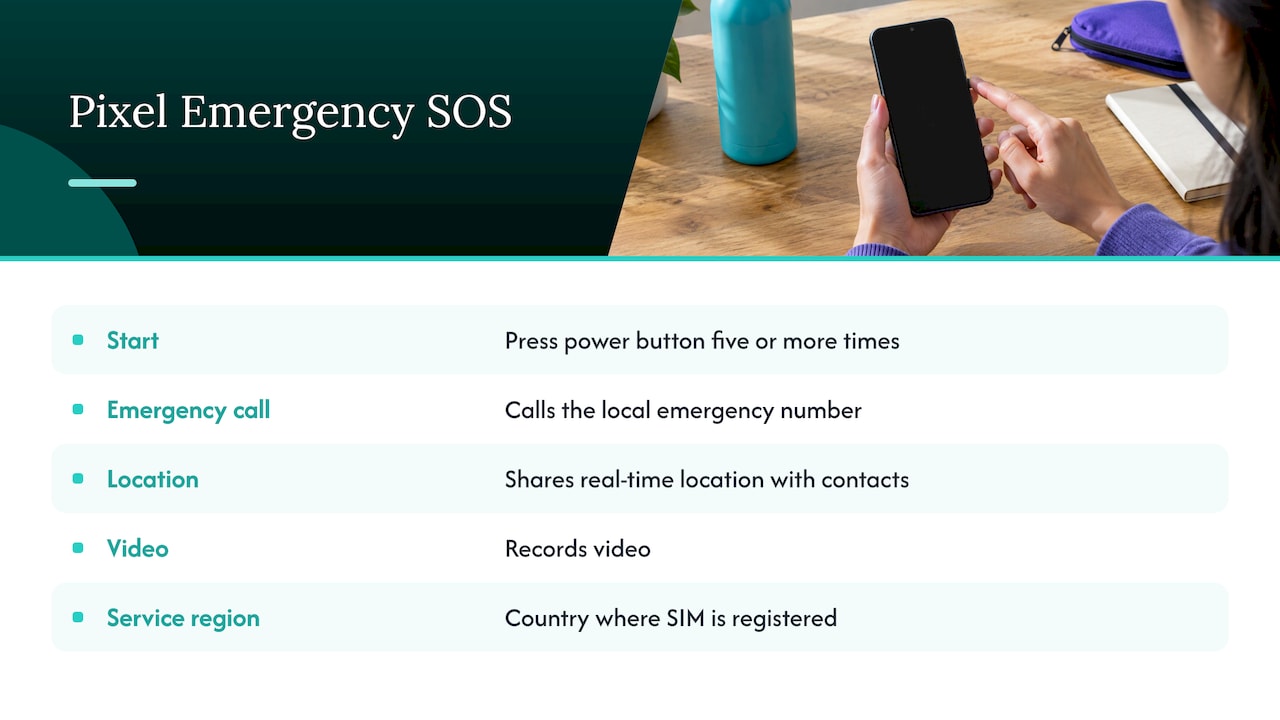
If you have a Pixel, the feature to learn is Emergency SOS, not a voice command. Google’s Pixel guidebook explains that it can be set up to call the local emergency number, share your real-time location with emergency contacts and record video. You start it by pressing the power button quickly five or more times. The automated service works in the country where your SIM card is registered.
That button press works without speaking and without unlocking a menu, which suits a fall, a sudden illness or a frightening situation where talking is hard. If the phone belongs to an older parent, sit with them and practice the press once, then confirm that their emergency contacts are saved. Our guide to Android Emergency SOS setup for Pixel and Samsung walks through the steps, and the guide to setting up emergency auto dial contacts so someone answers covers choosing who gets the alert.
Car crash detection
Pixel phones can also detect a severe car crash and automatically call emergency services and share the phone’s location. This is useful for a parent who still drives. It only helps in a crash, though, not in the far more common situation of a fall or illness at home.
Satellite SOS when there is no signal
Satellite SOS is available on Pixel devices since Pixel 9 (except Pixel 9a) in the US, Canada, Puerto Rico, Australia and listed European countries. It lets you contact emergency services by satellite without Wi-Fi or mobile coverage. You answer an emergency questionnaire and follow on-screen prompts, and you need a clear view of the sky because obstructions can block the connection. It is a good fit for hikers and rural drivers, and for families whose relatives live where coverage is patchy.
Pixel Watch: help from the wrist
A watch can be easier to reach than a phone that is in another room. Google says the Pixel Watch can connect you to emergency services through Settings, then Safety & emergency, then Emergency SOS. Fall Detection and Car Crash Detection are part of the same safety menu, according to Google’s Pixel Watch safety page.
The connection rules matter:
- Wi-Fi models need a nearby phone connected by Bluetooth to call emergency services.
- LTE models can call without a nearby phone, but they need an active LTE connection.
A parent who leaves the phone charging in the bedroom while gardening may be wearing a Wi-Fi watch that cannot place a call. Check which model you have before you assume it is covered.
Google Home and Nest speakers
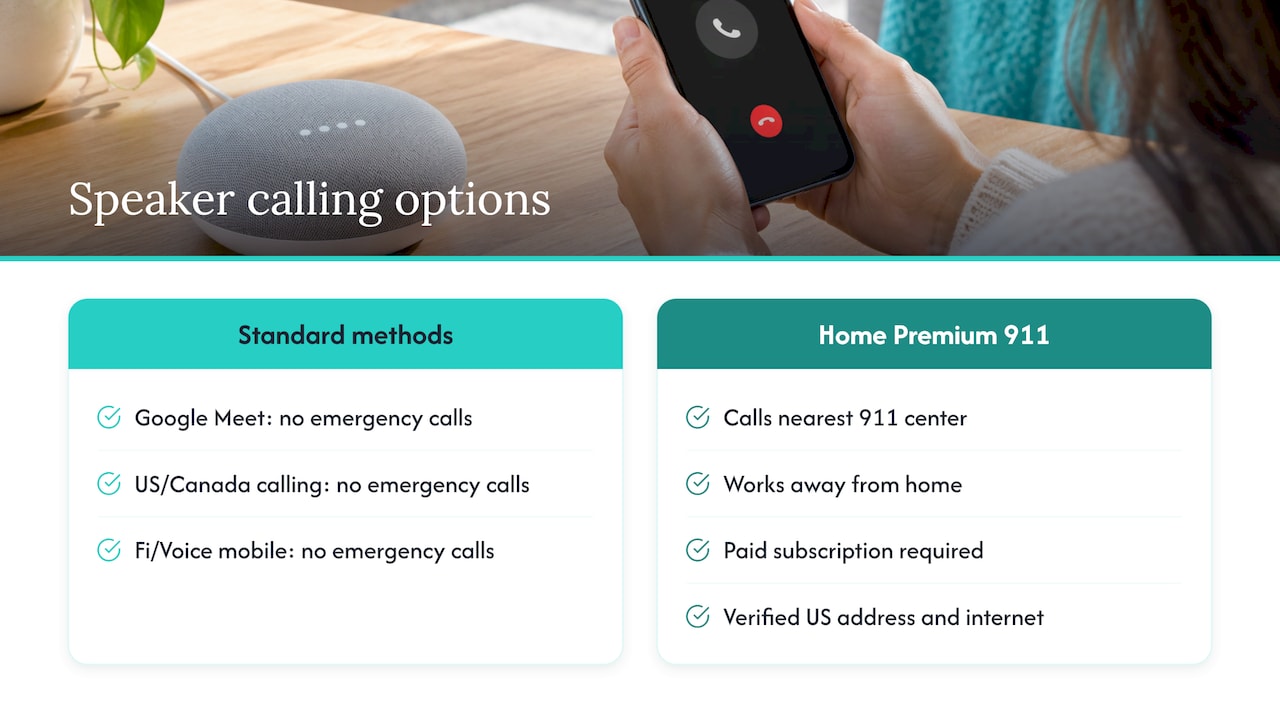
This is where the most common confusion sits. Google’s setup page for smart speakers and displays lists the calling methods they support: Google Meet calling, Google-supported calling in the US and Canada, and mobile calling with Google Fi or Voice in the US. It states plainly that none of these methods supports emergency calls.
There is one paid exception in the US. Google Home Premium subscribers can use the Home app to contact the 911 call center closest to their home, even when away. Setup requires a paid subscription, a verified US address, working internet and other requirements listed on that page.
So if your mother has a smart speaker in the kitchen and you believe it is her safety net, confirm exactly what it does. For most households, it is a speaker that can play music and set timers. It is not an emergency line.
Quick comparison
| Option | Can it reach emergency services? | What it needs | Alerts a family member if nothing happens? |
|---|---|---|---|
| Dialing 911 on the phone | Yes | Cellular or Wi-Fi connection | No |
| Voice command to the assistant | Not dependable, so do not rely on it | Correct phrasing, working device | No |
| Pixel Emergency SOS (five power presses) | Yes, with call setting on | Pixel phone, SIM in the country | Shares location with emergency contacts when set up |
| Pixel Satellite SOS | Yes, without coverage | Pixel 9 or later (not 9a), clear sky | No |
| Pixel Watch Emergency SOS | Yes | Phone nearby (Wi-Fi model) or LTE | Depends on settings |
| Google Home speaker | Standard calling: no. Home Premium in US: yes via app | Paid subscription, verified address | No |
| Well-Check daily check-in | Alerts your contacts, who can act | App on the phone | Yes, when a check-in is missed |
The gap every one of these leaves
All of the tools above wait for the person to act. Emergency SOS needs a button press. A voice command needs a voice. A watch needs to be worn and connected. They are good for a moment of crisis in which the person is conscious and able to ask for help.
Much of the worry families feel is about the other situation: a parent who has fallen and cannot reach the phone, who has become confused, or who simply did not get up this morning. In that situation, nobody is pressing anything. What helps is a routine that makes silence visible.
About 16 million older adults in the US feel isolated, which is the reason we built Well-Check around a daily check-in. The idea is simple. Your parent taps once to say “I’m okay.” If the tap does not come, the people they chose are alerted and can call, visit or send help. Our missed check-in protocol explains what family should do, step by step, when that alert arrives.
How to build a layered setup for someone living alone
The goal is not to replace the emergency features Google provides. Use them, and add the one thing they lack.
1. Set up the phone’s emergency tools
On a Pixel, turn on Emergency SOS and practice the five-press start once. Add emergency contacts in the phone settings. On an iPhone, the equivalent steps are in our guides to enabling Emergency SOS on iPhone and setting up emergency contacts on iPhone.
2. Choose three to five people who will actually answer
A list of ten names that never pick up is worse than three who do. Decide who is first, who is backup and who lives nearby. Our guide on building a verified emergency contact list shows how to confirm each person has agreed and has the right number.
3. Add a daily check-in
Pick a time that fits the person’s routine, such as after breakfast. Keep the question to one tap. If you are unsure what to ask, see the five one-tap daily check-in categories. How often you need it depends on the person’s health and habits, and the guide to check-in frequency for seniors helps you decide.
4. Agree on what happens after a miss
Write down who calls first, how long they wait, and when someone drives over or asks a neighbor to knock. A family that has agreed on this in advance acts in minutes rather than debating by text. Our family emergency alerts guide shows how to test the whole chain in under an hour.
5. Keep it dignified
People accept safety tools when they feel in control. Explain that the check-in is a one-tap habit, not surveillance. If location sharing is part of the plan, talk it through first. The temporary location sharing guide shows how to share for one hour instead of permanently, and the piece on privacy and consent for GPS apps covers how to have that conversation.
If the phone only lets you make emergency calls
A frequent search is why an Android phone allows only emergency calls. That usually means the phone has no usable network connection, for example no active plan or SIM. In that state, emergency calls can still go through where networks permit, which is one reason an old phone with no plan is still worth keeping charged as a backup. For anything else, such as an unpaid plan or a SIM problem, contact the carrier.
What has changed recently
Google has expanded its emergency tools in recent years: Pixel phones gained satellite SOS from the Pixel 9 generation, and Android introduced Emergency Live Video, which lets you share video with dispatchers during calls or texts. Availability depends on your device, your country and whether the local emergency center supports the feature, so check Google’s emergency calling help page for what applies to your phone today.
Our perspective
We built Well-Check for a specific moment: the one when nobody is pressing a button.
A voice assistant, an SOS shortcut and a smartwatch are all good tools, and they all start with the person asking for help. The families we design for worry about the hours before that, when a parent living alone is quiet and no one knows why. A daily one-tap “I’m okay” turns silence into a signal, and a missed check-in alerts the emergency contacts the person chose.
We designed the app for simplicity and dignity. The tap takes a second, the contact network is customizable, and the experience aims for independence without surveillance. Medication reminders, GPS and smart caregiver analysis sit behind that simple surface for the families who want them.
The best setup uses the phone’s emergency features for the crisis and a daily check-in for everything that comes before it.
Brian
Well-Check plans
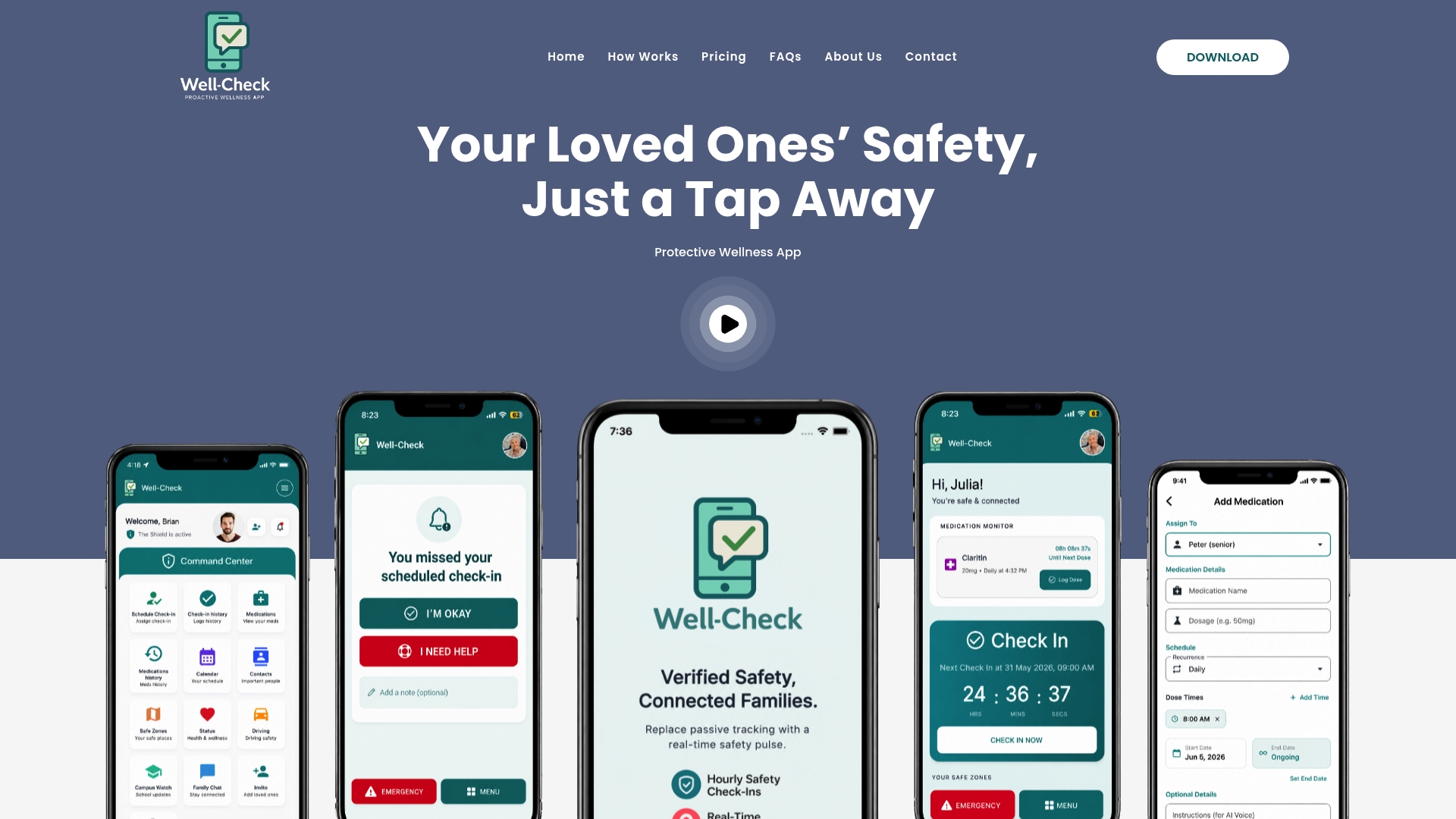
Well-Check comes in two plans, listed on our pricing page: Essential at $5.99 per month and Complete at $7.99 per month. The app offers daily check-ins, medication reminders, missed check-in alerts to emergency contacts, GPS tracking, and one-tap help with “I’m okay” confirmations, with advanced scheduling and unlimited check-ins in our plans. Start with the senior safety checklist to set it all up in one sitting.
If you are choosing for a parent, pick the plan together and set the first check-in time with them. That one conversation does more for their comfort than any feature.
FAQ
Can I say “Hey Google, call 911”?
Do not count on it. Google advises that in an emergency you dial your local emergency number directly, and its documentation notes that automated systems contacting emergency services are tightly regulated. Use the dialer, or a Pixel’s Emergency SOS button sequence, because they work without the right phrasing.
Can Google Home or a Nest speaker call 911?
Not through standard calling. Google states that Meet, Google-supported calling and Fi or Voice mobile calling on its speakers and displays do not support emergency calls. In the US, Google Home Premium subscribers can reach the nearest 911 call center through the Home app after meeting the setup requirements.
Does Emergency SOS work without a signal?
Most emergency calls need a cellular or Wi-Fi connection. On Pixel 9 and later models (except the 9a), Satellite SOS can contact emergency services without either, in the US, Canada, Puerto Rico, Australia and listed European countries. You need a clear view of the sky.
How do I know if a parent living alone is okay if they can’t ask for help?
Use a routine that does not depend on them asking. A daily check-in that alerts family when it is missed gives the people they trust a reason to call or visit. Pair it with the phone’s emergency features for the moments when they can reach out themselves.
Sources
- Making Emergency Calls on Google Products, Google Help
- Emergency SOS, Pixel guidebook
- Get emergency help through satellite with your Pixel phone
- Get help in an emergency with Google Pixel Watch safety features
- Set up calling on your Google smart speaker or display
- Emergency calling with Google Home Premium