You have three realistic ways to get emergency auto dial contacts working: the SOS feature already built into your smartphone, a dedicated auto-dialer device, or an app that checks in daily and alerts people when something is wrong. The phone feature is free and fast. A dialer is a one-time purchase. An app covers the case the other two miss: the person who cannot press anything at all. Whichever you choose, the system is only as good as the people on the other end of the call.
TL;DR
- Android and iPhone both have an Emergency SOS feature that calls emergency services and alerts your chosen contacts. Turn it on and test it today.
- Standalone auto-dialers cost roughly $140 to $500 once, dial numbers in sequence, and cannot confirm that anyone picked up.
- A button only helps if the person can press it. Missed check-in alerts cover the falls, fainting spells and sudden illness where nobody can.
- Name three to five contacts, tell them their role, and plan for the ones who will not answer.
- Add a way for responders to get in, such as a key lock box, or the call may not be enough.
Table of Contents
- What “emergency auto dial” actually means
- Option 1: The Emergency SOS already on your phone
- Option 2: Dedicated auto-dialers and emergency phones
- Option 3: An app that calls your people when you cannot
- Build the contact list before you pick the tool
- Phone, device or app: how to choose
- Our perspective: independence without surveillance
- Pricing and how to try Well-Check
- A 30-minute setup you can do today
- FAQ
- Sources
What “emergency auto dial” actually means
People use the phrase for three different things, and the right choice depends on which one you need.
- Phone-based SOS. You trigger it from a smartphone with a button sequence. The phone calls 911 and texts your emergency contacts.
- Hardware auto-dialers. A box, wall phone or pendant that dials pre-programmed numbers when someone presses a button or an alarm trips.
- App-based alerting. Software that notifies contacts when you tap for help, or when you fail to check in on schedule.
The first is the quickest to set up. The second suits places with a landline and no smartphone. The third is the only one that works when the user cannot act. We cover each one below, then show how to build the contact list that sits behind all of them.
Option 1: The Emergency SOS already on your phone
Most people already own an auto-dial system and have never switched it on.
Android
Google’s help page explains that on Android you press the power button five or more times to start Emergency SOS. Depending on your settings, you either touch and hold inside a red circle for three seconds or wait for the automatic call. The same page notes that the phone can contact emergency services automatically in some countries and regions and with certain carriers, so check what your device actually does rather than assuming.
iPhone and Apple Watch
Apple describes a setting called Call with 5 Button Presses. Five rapid presses of the side button start a countdown to an emergency call. Apple also notes that Emergency SOS can alert your emergency contacts. That only works if you have entered them, which is the step most people skip.
If you carry an iPhone, our walkthroughs cover enabling Emergency SOS in about two minutes and setting up emergency contacts on iPhone. Filling in the Medical ID fields gives responders your conditions and medications from the lock screen.
Where phone SOS falls short
- It needs a mobile network or Wi-Fi connection.
- It needs the user to be conscious and able to press a button, often five times in a row.
- Accidental triggers happen, and some older adults turn the feature off after one false alarm.
- It does nothing if the phone is in another room, charging, or on silent.
That last point catches many families. A phone on Do Not Disturb can swallow the very alert you were counting on, so it is worth running our six Do Not Disturb exception checks and, on iPhone, knowing how to fix a stuck Critical Alerts prompt.
Option 2: Dedicated auto-dialers and emergency phones
The top search results for this keyword are mostly hardware: a wall phone that dials 911 when the handset is lifted, a hotline dialer powered by the phone line, and a push-button device priced at several hundred dollars. They solve a real problem, but you should know what they do and do not do.
What they cost
Research on programmable units puts one-time purchases at roughly $140 to $500. These connect to a phone line or Ethernet and can call four to ten numbers in sequence. Some IP-based models include 500 voice or SMS alarm credits, with extra credits at about $0.02 each, which suits anyone who wants to avoid a monthly fee.
What they cannot do
They have no 24/7 professional monitoring, and they depend on the person receiving the call actually answering. Traditional amplified emergency phones can play a recorded message down the list but may fail if a contact is unavailable or the line is dead. They also usually lack any confirmation step, so nothing tells the sender whether a human heard the alert.
Those are not reasons to avoid a dialer. A landline-only household with no smartphone user may be well served by one. They are reasons to pair it with a contact plan, which is the next section.
Option 3: An app that calls your people when you cannot
A button asks the user to act. Daily check-in apps flip that around: if the person does not respond, the system acts for them.
This is the gap that matters most for older adults who live alone. A fall, a stroke or a fainting spell removes the ability to press anything. Pilot research on technology-based emergency response shows that impact depends on how often and how correctly people use the equipment, and that technology works best as one part of a broader care plan rather than a standalone fix. A check-in rhythm that fits into someone’s morning builds the habit that makes the rest work.
Well-Check is built around that idea. The user taps once to say “I’m okay.” If a check-in is missed, the app alerts the emergency contacts. There is also one-tap help, medication reminders, GPS tracking and smart caregiver analysis. Our older adult check-in app page shows how it looks from the senior’s side.
Build the contact list before you pick the tool
Senior care experts keep returning to one point: the effectiveness of an alert device is limited by the quality of its responder network. If the people you list are often unreachable, the best technology still fails. One caregiver on a public forum described being 30 miles away and unable to hear the phone when a parent fell. That is an ordinary situation, not a rare one.
A workable structure
- Three to five people. Fewer leaves gaps. More creates confusion about who acts. Our guide to building a verified contact list with three to five people walks through it.
- Different time zones and schedules. Include one person who lives close, one who works from home, and one who is reachable at night.
- Defined roles. Decide who calls first, who drives over, and who calls 911 if there is no answer. Our piece on who to list as emergency contacts includes a printable card.
- Verification. Call or message each person, confirm the number, and make sure they know they are on the list.
- A backup for the backup. Plan for non-availability. Facilities face the same problem at scale, and guidance on emergency contact directories for long-term care shows how a structured, regularly checked directory keeps responders reachable.
Tier the response
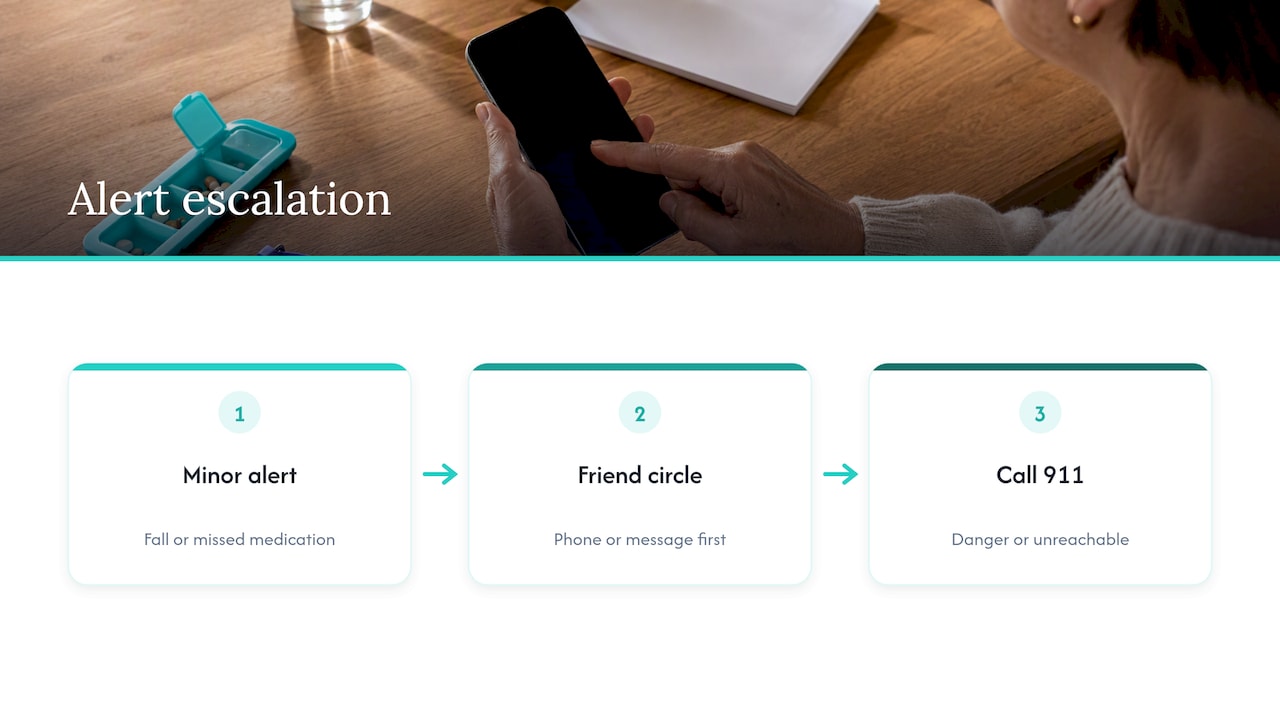
Not every alert needs an ambulance. Care programs that monitor falls escalate through a pre-identified circle of friends by phone or message before anything else, which suits minor incidents such as a fall without injury or a missed medication alert. Reserve the 911 call for situations where someone is in danger or cannot be reached. Our guide on family emergency alerts explains how to set the tiers and test them in under an hour.
Plan for getting inside
Calling for help is only half of it. If someone is unresponsive, responders may need to enter the home. Families often use a combination key lock box and share the code with emergency services or specified contacts, which can prevent a door being broken down. Decide this before you need it.
Phone, device or app: how to choose
| Situation | Best fit | Watch out for |
|---|---|---|
| Tech-comfortable adult who wants a free baseline | Built-in Emergency SOS | Needs the user to press the buttons and keep the phone nearby |
| Landline home, no smartphone | Hardware auto-dialer | No confirmation that anyone answered, and a dead line means no call |
| Lives alone, may be unable to press anything | Daily check-in app with missed check-in alerts | Needs a charged phone and a reliable contact list |
| Wants no wearable | App or smart speaker service | Coverage limited to where the phone or speaker is |
Many households end up combining two. Smartphone SOS plus a check-in app covers both the “I can press it” and “I cannot” cases. If you are weighing a dedicated device against an app, our guide to choosing a medical alert app or device by real habits starts from how the person lives rather than from a feature list.
Our perspective: independence without surveillance
We build Well-Check because the choice has too often been framed as safety or freedom. Older adults tell us, and research on aging in place agrees, that most want to stay in their own homes. Experts describe non-intrusive monitoring as a way to give families peace of mind without constant observation, which protects dignity.
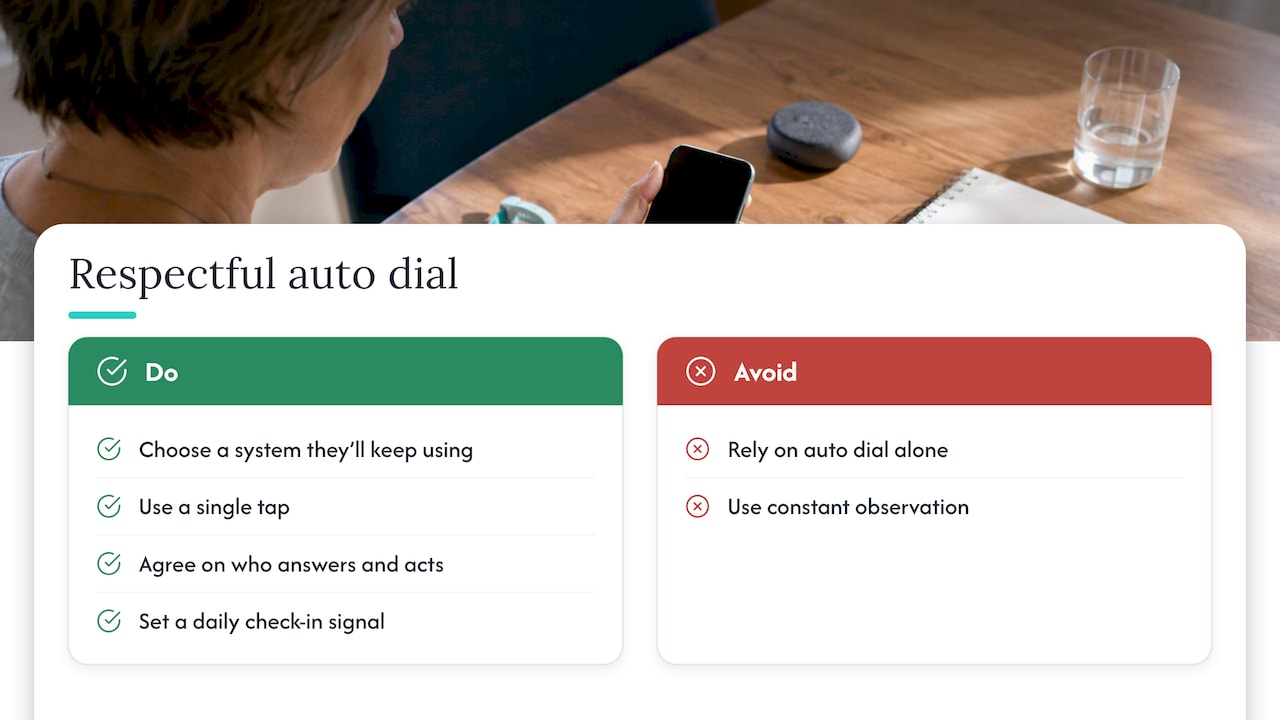
That shapes how we think about auto dial. The best emergency system is the one the person is willing to keep using. That usually means a single tap, no cameras in the living room, and contacts who know what a missed check-in means and what to do about it.
We also think auto dial on its own is overrated. A call that goes to voicemail is not a rescue. What matters is a short list of people who have agreed to answer, a clear order for who acts, and a daily signal that tells them something is off before a day or a weekend has passed. Technology is one layer. The people are the other.
— Brian
Pricing and how to try Well-Check
If you want the check-in layer on top of your phone’s SOS, Well-Check has two plans: Essential at 5.99 USD per month and Complete at 7.99 USD per month. You can compare them on our pricing plans page and see what suits the person you are setting it up for. Pair it with our medication reminders guide if a missed dose is part of what worries you.
A 30-minute setup you can do today
- Turn on phone SOS on the senior’s device and, for iPhone, fill in the emergency contacts and Medical ID.
- Pick your contacts. Choose three to five, confirm each by phone, and assign roles.
- Decide the escalation. Who is called first for a missed check-in, and at what point someone calls 911 or requests a welfare check.
- Sort out access. Install a lock box or give a trusted neighbor a key.
- Set a check-in time that fits the person’s morning routine. Our guide to how often to check in helps you choose a rhythm that does not feel like nagging.
- Test it. Trigger a practice alert, see who responds, and fix what fails. Repeat monthly. Our living alone safety checklist includes the monthly tests, and a short safety plan is a good first move if you have nothing in place.
FAQ
How do I automatically call an emergency contact?
On an iPhone, turn on Call with 5 Button Presses and add emergency contacts so they are alerted when SOS starts. On Android, press the power button five or more times and make sure your emergency contacts are saved in the Personal Safety app. For automatic calls when you cannot act, you need a check-in app or a monitored system.
How much does an auto-dialer cost?
Programmable emergency auto-dialers typically run from about $140 to $500 as a one-time purchase. Some IP-based units include 500 alarm credits and charge around $0.02 for each extra one. Those prices usually do not include professional monitoring.
What are good emergency call options for seniors?
It depends on the person. A smartphone user can start with built-in SOS and a daily check-in app. Someone with only a landline may prefer a hardware dialer, but should know it cannot confirm that a contact heard the message. A doctor, social worker or local Area Agency on Aging can help you match the option to a person’s health and habits.
What if my contacts do not answer?
This is the most common failure, so plan for it. List several people with different schedules, tell each one their role, and agree on a next step such as calling a neighbor or 911 after a set number of unanswered attempts. Test the chain regularly.
Sources
- Get help during an emergency with your Android phone, Android Help
- Make an emergency call or text on iPhone or Apple Watch, Apple Support
- IP Alarm Auto Dialer, PC Poodle
- Feasibility of Ambient Sensing Technology for Fall Detection in People with Cognitive Changes, PMC
- When do you press an elderly person/parent to seriously consider a medical alert device, AgingCare
- 10 codes, Commercial Response
- Technology-based emergency response study, MDPI
- 18 Best Smart Home Devices to Help Aging in Place, Cancervoid Health