Safety app privacy can genuinely protect you, but their privacy practices vary a lot from one app to the next. Before you rely on any of them, open your device’s permission settings or the app’s privacy label and see exactly what it collects. Platform tools already exist to verify this yourself. Do that first, then decide.
TL;DR:
- Most safety apps request location data, which can reveal detailed personal habits and medical locations if shared continuously in the background.
- Regulators require apps to specify exact data retention periods, clear purpose descriptions, and disclose specific third-party data sharing to ensure transparency.
- Using device tools like iOS App Privacy Report and Android Permission Manager reveals actual data practices and helps identify hidden background tracking.
- Setting location to “While Using,” revoking unnecessary permissions, and disabling analytics significantly reduces privacy risks with minimal effort.
- Choosing apps that prioritize on-device processing, clear purpose, and explicit privacy policies can ensure safety does not come at the expense of privacy.
Table of Contents
- Safety App Privacy: What These Apps Collect and Where the Risk Hides
- What Regulators Expect From Apps Handling Sensitive Data
- Auditing an App Yourself: iOS and Android Tools That Don’t Lie
- A Permissions Checklist You Can Run in the Next Ten Minutes
- How to Judge a Safety App’s Privacy Before You Subscribe
- What Privacy-Aware Design Looks Like in Practice
- Safety and Privacy Aren’t Actually in Conflict
- Try a Safety App Built Around Minimal Data Sharing
- Where to Verify These Claims Yourself
- Sources
- FAQ
Safety App Privacy: What These Apps Collect and Where the Risk Hides
A safety check in app needs some data to work. A check-in feature needs to know your status — making a HIPAA-compliant check-in for clinics a useful model when considering privacy and security in health-related safety apps. An alert system needs a way to reach your emergency contacts. But “needs” and “collects” are often two different lists, and the gap between them is where privacy problems start.
Most personal safety and wellness apps ask for some combination of the following:
- Location data, often continuous or background GPS, not just a one-time ping
- Contacts, usually to populate an emergency network
- Health markers, like medication schedules, mobility notes, or fall history
- Audio or video, in apps built around SOS recording or video check-ins
- Device identifiers, which advertising and analytics systems use to track you across apps
Location is the riskiest item on that list, not because it is inherently dangerous, but because it is uniquely good at re-identifying a person. A handful of location pings tied to a device ID can reveal where someone sleeps, works, and receives medical care, and the FTC’s 2024 action against a data broker selling sensitive location data made clear that vague disclosures about how that data gets shared don’t satisfy informed consent.
The other quiet risk is third-party software development kits. Analytics tools, crash reporters, and ad networks bundled inside an app can pull data out through their own channels, separate from whatever the app’s front end tells you. A safety check in app might collect nothing suspicious on its own, then hand your location and device ID to five vendors you’ve never heard of.
Storage matters too. Data processed on-device and discarded stays under your control. Data pushed to a cloud server, especially one shared across features or business units, creates a bigger target and a longer paper trail. React Native’s own security documentation warns developers not to log personal data or cache it unencrypted, precisely because so many apps leak information this way without anyone intending it.
What Regulators Expect From Apps Handling Sensitive Data
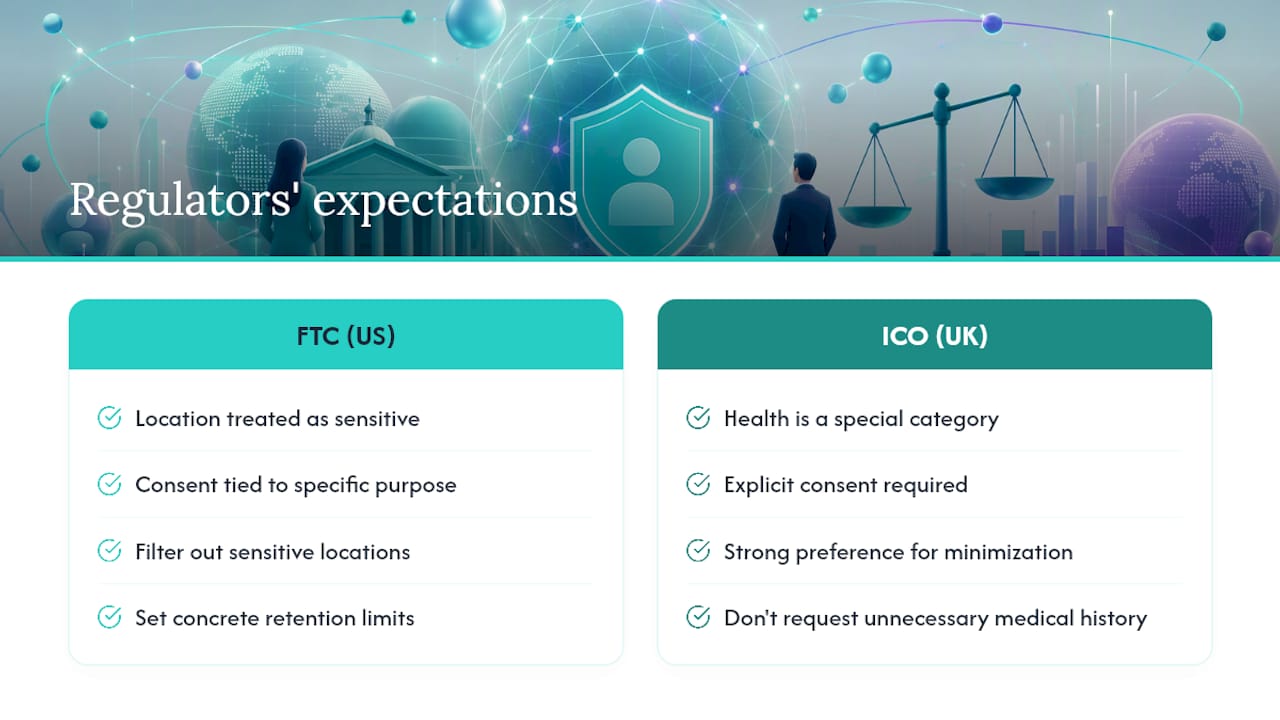
Regulators don’t leave app privacy to guesswork. Two bodies set the tone most safety app developers are measured against: the FTC in the United States and the ICO in the United Kingdom.
The FTC’s position, reinforced through a string of 2024 and 2024 blog guidance on location data, is that location is sensitive by default. Consent has to be specific to the purpose, not buried in a general terms-of-service checkbox. The agency has specifically flagged the need to filter out sensitive locations, set real retention limits, and monitor vendors who touch that data downstream.
A common industry claim is that broad consent checkboxes satisfy disclosure requirements. Regulatory guidance says otherwise: consent has to be tied to a specific, understandable purpose, not a blanket agreement.
The UK’s approach through the ICO’s guidance on special category data treats health data as its own protected category under UK GDPR, requiring explicit consent and a strong preference for data minimization. If an app can confirm you’re safe without knowing your exact medical history, the ICO’s position is that it shouldn’t ask for the medical history at all.
Practically, this gives you three things to look for in any app’s privacy policy: a stated retention window (not “as long as necessary,” but an actual timeframe), named categories of third parties it shares with, and a working opt-out for anything beyond core function.
Auditing an App Yourself: iOS and Android Tools That Don’t Lie
Store listings tell you what a developer says the app does. Your phone’s built-in audit tools tell you what it actually does, and the two don’t always match.
- Turn on iOS App Privacy Report. Found under Settings, Privacy & Security, this report shows exactly which sensors (camera, microphone, location) each app has accessed in the last seven days, plus every network domain it has contacted. If a safety check in app is quietly reaching out to a dozen advertising domains, this is where you’ll see it.
- Open Android’s Permission Manager. It groups every app by permission type, so you can see at a glance which apps have location, camera, or contacts access, and revoke it directly. Android’s auto-reset feature also strips permissions from apps you haven’t opened in months.
- Cross-check against the Play Store’s Data safety section, but treat it as a starting point, not a verdict. That information is self-reported by the developer, and audits of these labels have found gaps between what’s declared and what the app’s own network traffic shows.
Pro Tip: Run the App Privacy Report a week after installing any new safety app, not on day one. Some background data collection only kicks in after setup, onboarding, or your first missed check-in, and a same-day check can miss it entirely.
A Permissions Checklist You Can Run in the Next Ten Minutes
You don’t need to audit every app on your phone today. You need to fix the one that has your location, your contacts, and possibly your medical information. Here’s the order that gets you the most protection for the least effort.
- Set location to “While Using” or “Ask Every Time.” Background, always-on location is rarely necessary for a check-in app, and it’s the single biggest privacy exposure on your phone.
- Turn off precise location where approximate will do. Both iOS and Android let you share a general area instead of exact coordinates, which is often plenty for a wellness check-in.
- Revoke camera, microphone, and contacts access for anything the app isn’t actively using. If the SOS video feature is off, the camera permission can be off too.
- Request your data be deleted from any account you’ve closed, and check whether the app states a retention period anywhere in its policy.
- Disable analytics or personalization toggles buried in account settings. These are usually opt-out, not opt-in, and most people never find them.
- Keep your OS updated and remove apps you no longer use. Old, unpatched apps sitting on your home screen are a bigger risk than most people assume, and unused apps still holding permissions are pure liability with zero benefit.
Pro Tip: Check your lock screen notification settings for any safety check in app that shows check-in status or location previews. A glanceable widget is convenient for you, but it’s also visible to anyone who picks up your phone.
How to Judge a Safety App’s Privacy Before You Subscribe
Skip the marketing copy and read the privacy policy like a checklist. A trustworthy safety check in app should be able to answer these plainly, without redirecting you to a wall of legal text:
- Does it collect only what the core feature needs, or does it ask for contacts, camera, and full location history just to send a daily check-in reminder?
- Is there a stated purpose for every data type it requests, not a general “to improve our services” catch-all?
- Does it name a retention schedule, or does data sit indefinitely?
- Does it disclose specific third parties it shares with, by name or category, rather than a vague “partners and affiliates”?
- Does it process anything sensitive on-device, or does everything route through a server by default?
Red flags cluster around vague language. Phrases like “may share with select partners” or “as permitted by law” without further detail usually mean the policy was written for legal cover, not for your understanding. A long list of embedded trackers is another warning sign, and so is any core feature that won’t function unless you agree to data sharing that has nothing to do with that feature. Location sharing for a fall-detection alert makes sense. Location sharing tied to ad personalization inside the same app does not.
What Privacy-Aware Design Looks Like in Practice
Well-check was built around a simple idea: a family member wants to know someone is safe, not track their every move. That shows up in specific design choices, not just a policy statement. The one-tap check-in lets someone confirm they’re okay without the app running background location the rest of the day. Emergency contact networks are configurable, so users decide exactly who sees an alert, rather than defaulting to broad sharing. GPS tracking exists for moments that call for it, like a missed check-in, not as a constant background process.
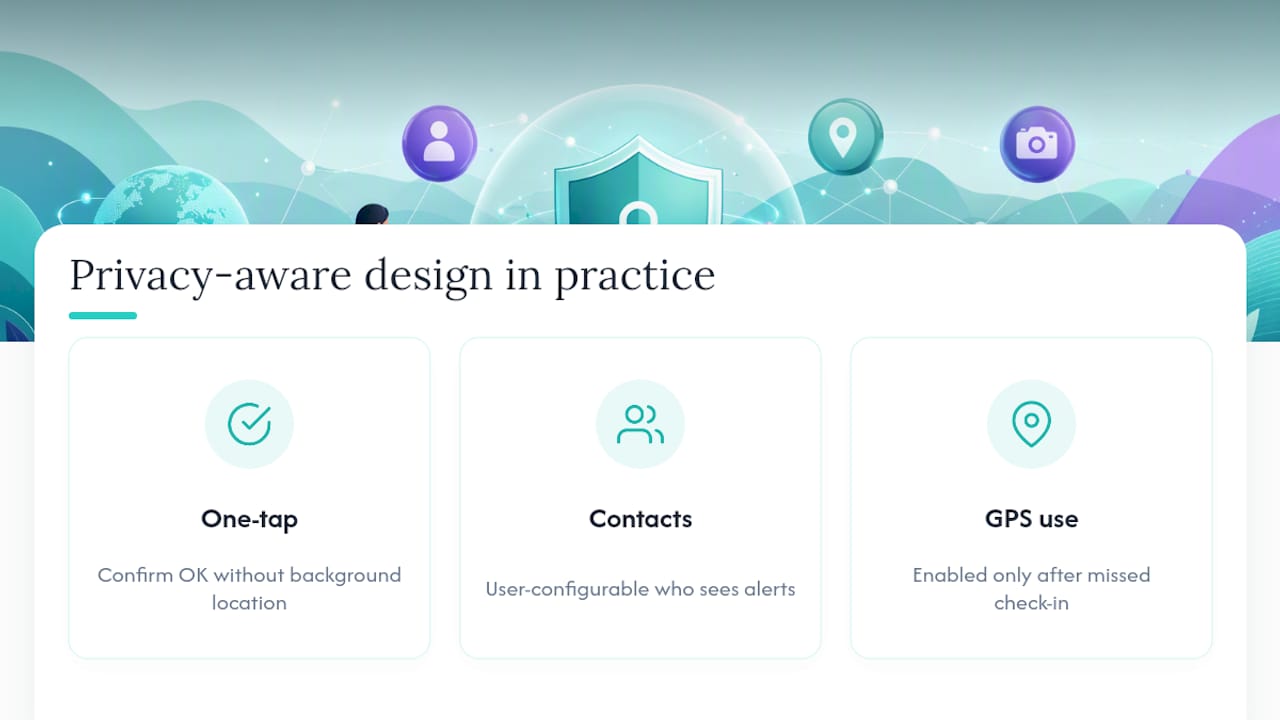
That mirrors what the ICO’s minimization guidance recommends: keep sensitive processing on-device where possible, and collect only what the specific feature actually needs.
Safety and Privacy Aren’t Actually in Conflict
The idea that safety apps have to trade privacy for protection is mostly a false choice sold by apps that never bothered to design around minimization. Precise, always-on location tracking doesn’t make a check-in system safer than approximate location with a clear alert trigger. It just makes the app’s data footprint bigger.
The more useful mindset is to stop trusting marketing language and start using the verification tools already sitting on your phone. App Privacy Report and Permission Manager exist for exactly this reason, and running them takes less time than reading a privacy policy in full. If an app resists that kind of scrutiny, or its behavior doesn’t match its stated policy, that tells you more than any five-star rating ever will.
Push for policies that state a retention period in plain numbers, not legal hedging. Push for controls you can actually find in the settings menu, not ones buried three taps deep. The apps worth trusting make that easy on purpose.
— Brian
Try a Safety Check in App Built Around Minimal Data Sharing
If the checklist above left you wanting an app that already follows these principles instead of one you have to constantly police, Well-check is built for exactly that. One-tap check-ins and “I’m okay” confirmations mean daily status updates without constant background tracking, and GPS activates around specific moments like a missed check-in rather than running all day. You choose exactly who sits in the emergency contact network, and medication reminders plus smart caregiver analysis run without adding data requests unrelated to safety.
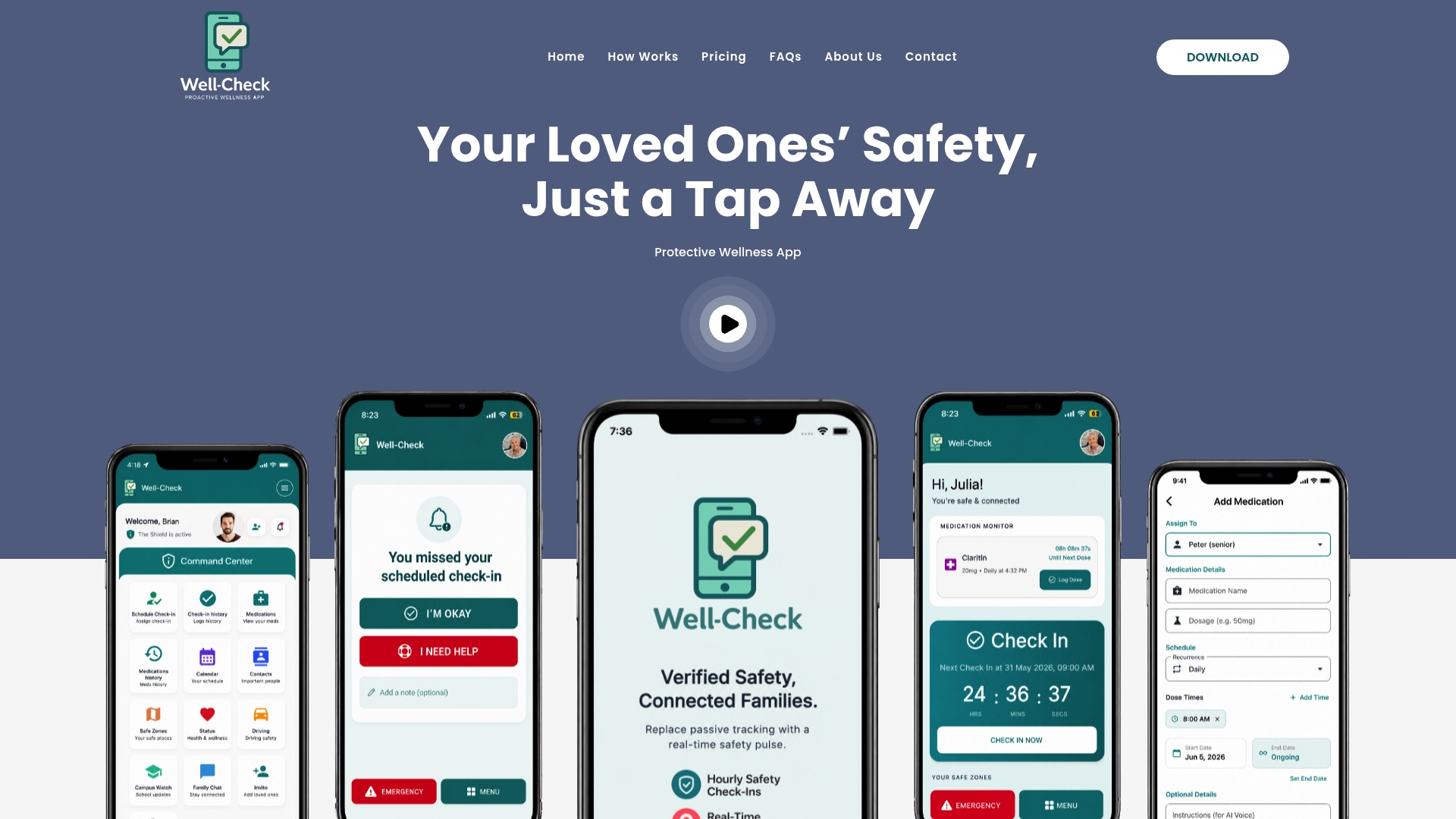
The Essential plan runs $5.99 per month, and Complete runs $7.99 per month, both listed on the Well-check pricing page. Match the features to what your family actually needs before you pick a tier. If you want to see the check-in flow before committing, the product walkthrough shows exactly how location sharing and alerts work in practice.
Where to Verify These Claims Yourself
For deeper reading: the FTC’s location data guidance covers enforcement expectations, the ICO’s special category data guidance covers minimization, and the OWASP Mobile Security Cheat Sheet covers technical safeguards developers should follow.
Sources
- FTC press release on location data enforcement
- ICO guidance on special category data and data minimization
- OWASP Mobile Application Security Cheat Sheet
FAQ
What Is the Safety Check in App on My Phone?
Most phones ship with a built-in personal safety feature rather than a separate app. On iPhone, it lives inside Settings under Privacy & Security as part of the App Privacy Report tools, while Android bundles similar SOS and emergency-sharing features into its Safety section. Third-party apps like Well-check add features such as scheduled check-ins and caregiver alerts on top of what’s built in.
Do I Need a Separate Personal Safety App on My Phone?
Not necessarily. Built-in tools handle basic SOS alerts and emergency sharing well, but they don’t offer scheduled check-ins, medication reminders, or caregiver notifications the way a dedicated app like Well-check does. Whether you need a separate app depends on whether you want proactive daily monitoring or just an emergency fallback.
Which App Is Safe for Privacy Among Safety Apps?
No single answer fits everyone, since “safe” depends on what data an app actually collects versus what it claims to need. Run the iOS App Privacy Report or Android Permission Manager on any app you’re considering, check its stated retention period, and confirm it doesn’t require location sharing for features that don’t need it.
Where Is Privacy and Safety on iPhone?
On an iPhone, go to Settings, then Privacy & Security, where you’ll find App Privacy Report, Location Services, and individual permission controls for every installed app. This is the same screen where you can review exactly what a safety app has accessed over the past week, including which network domains it contacted.
How Much Does Well-check Cost?
Well-check offers two plans: Essential at $5.99 per month and Complete at $7.99 per month, both listed on the pricing page. Each plan differs in feature depth, so matching the tier to your household’s actual needs is worth doing before you subscribe.