
A safety app is only as safe as the data practices behind it. Before you install one, look at four things: what it asks to access, where your information goes, how you control sharing, and how you can delete everything later. This guide walks through each, using advice from government agencies and privacy regulators, so you can judge any app for yourself or for an older parent.
TL;DR
- Safety apps can touch sensitive data: location, contacts, health details and routines. Approve only the permissions the app needs to do its job.
- Data lives on your phone, on the company’s servers, or with outside service providers. The privacy policy should say which, and who else receives it.
- You can reduce risk with a few settings: location “while using” where possible, a unique passphrase, multi-factor authentication, and regular updates.
- Deletion rights depend on where you live. California, the UK and the EU each give you a formal way to ask a company to delete your data.
- Deleting an app from your phone is not the same as deleting your account and the data attached to it.
Table of Contents
- What a safety app can know about you
- Where your data is stored and who can reach it
- How to judge an app’s security before you install it
- Settings that protect you after install
- Deleting your data: how to ask and what to expect
- Your privacy rights depend on where you live
- Our perspective
- Setting up a safety app with privacy in mind
- Well-Check plans
- FAQ
- Sources
What a safety app can know about you
Check-in and safety apps are useful because they know things: where you are, who your emergency contacts are, whether you answered today, sometimes which medications you take and when. That same information is what makes careful handling matter.
The European Union’s data protection advisers (the Article 29 Working Party) listed the kinds of data that mobile apps commonly reach and that call for separate, specific consent for each category: location, contacts, unique device identifiers, the identity of the user and the phone, payment data, telephony and SMS, browsing history, email, social network credentials and biometrics. A safety app will not use all of these, and a well-built one should ask for only the few it truly needs.
That last point is the principle of data minimization. The same opinion says developers should collect only what is strictly necessary for the function the user wants, and build protection in from the design stage. It is a European document, but it is a useful yardstick anywhere.
The data that matters most in a check-in app
For an app that helps a senior living alone, these are the categories to think about:
- Location. Useful in an emergency, but a trail of locations reveals routines, home address and habits.
- Contacts. An emergency network means names and phone numbers for other people, who also deserve care.
- Check-in history. Timestamps show when someone is usually awake, home or away.
- Health-adjacent details. Medication reminders can imply medical conditions.
None of this is a reason to avoid safety apps. It is a reason to choose one deliberately and set it up with the right limits.
Where your data is stored and who can reach it
The question “where is my data stored?” has more than one honest answer, because app data can sit in several places at once. According to the EU advisers, app data can be processed on the device or, once transferred, on the developer’s or third parties’ systems, and third parties can include analytics and advertising providers.
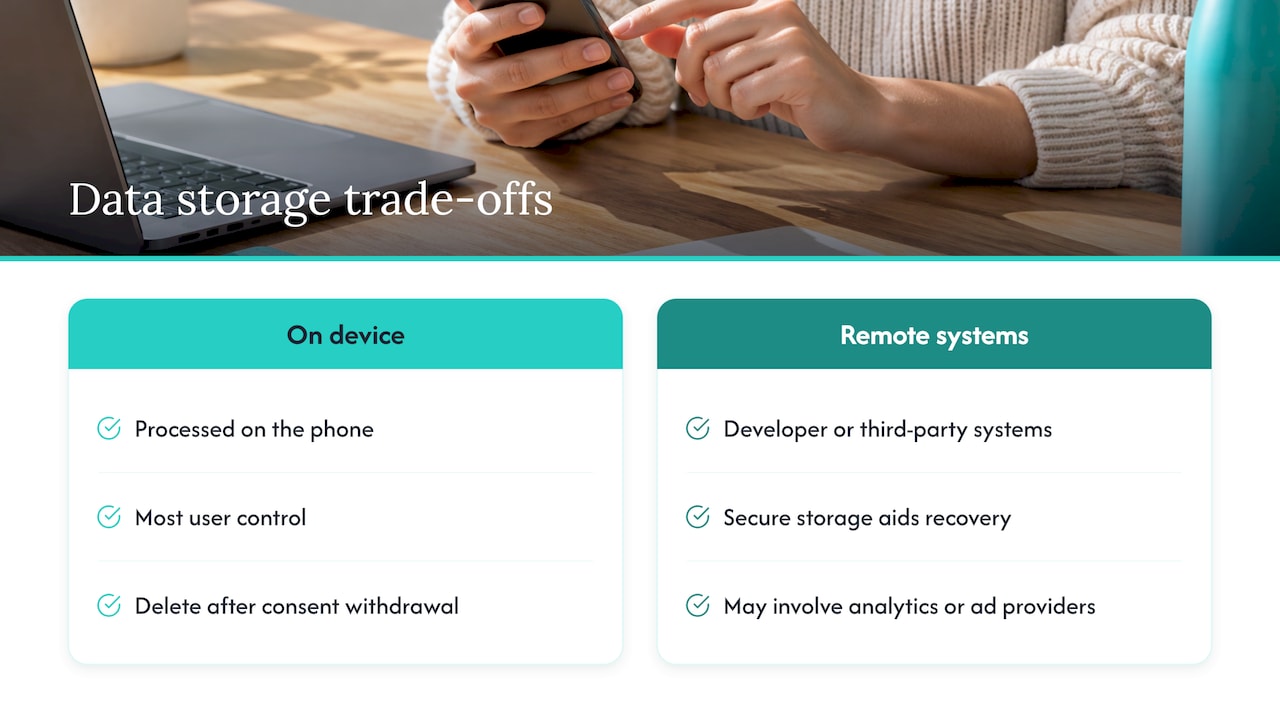
There are trade-offs in each setup. The same source notes that keeping data on the device gives users the most control, including the ability to delete it if they withdraw consent. Storing it securely in a remote location, on the other hand, can help recover it if a phone is lost or stolen. A check-in app that alerts family when you miss a check-in needs some information to leave your phone, since the alert has to reach someone else. What matters is how little leaves, where it goes and who sees it.
Three questions the privacy policy should answer
- What is collected? Look for a plain list: location, contacts, device identifiers, usage data.
- Who receives it? Look for named categories of recipients, such as cloud hosting, SMS delivery, analytics or advertising.
- When can it be shared with outsiders? The Safety Net Project, which advises survivors of abuse on technology, says a company should share information only to meet legal requirements, and notes that legal process such as a subpoena can be used to request user information from an app company. That is worth knowing if your situation involves a dispute.
If you want a deeper look at one slice of this, our guide to whether GPS tracking is safe covers privacy, security and consent for location features specifically.
How to judge an app’s security before you install it
You cannot audit an app’s code, but you can check the things regulators tell consumers to check. The advice from US, Canadian and Australian agencies is strikingly consistent.
Start with permissions
The US Cybersecurity and Infrastructure Security Agency (CISA) advises you to review app permissions, keep access to what each app needs, and take particular care with apps that can reach your contact list, camera, storage, location and microphone. It also suggests considering removal of apps that ask for too much. Canada’s Centre for Cyber Security gives the same test: does this app really need contacts, camera, storage, location or microphone?
A simple way to apply it: ask what the app does, then ask whether each permission serves that purpose. A daily check-in app has an obvious reason to send notifications and, if you turn the feature on, to use location. A camera or microphone request would need a clear explanation.
Read the settings, not only the policy
California’s Attorney General advises that after you download an app, you should pay attention to permission prompts and look for a privacy policy and privacy settings inside the app. Australia’s eSafety Commissioner adds that you should check settings for security, privacy, cookies and third-party sharing, and recheck them regularly because updates sometimes add features or change default privacy settings.
That last point is easy to miss. A setting you chose a year ago may have been reset or supplemented by an update.
Download from the official stores
The Canadian Centre for Cyber Security recommends getting apps from trusted sources such as official app stores. For a safety app, that means the App Store or Google Play listing, not a file sent in a text message.
Quick scorecard
| Check | What a good answer looks like |
|---|---|
| Permissions | Only those tied to a feature you use; each one explained |
| Privacy policy | Plain list of data collected, recipients and retention |
| In-app settings | Controls for location, sharing and notifications you can change at any time |
| Account deletion | A path inside the app and a web link to request deletion |
| Updates | Regular releases through the official store |
| Sign-in | Support for strong passwords and multi-factor authentication |
Settings that protect you after install
A secure app can still be undermined by a weak phone or a reused password. These steps come straight from government guidance.
- Limit location to when you need it. CISA recommends allowing location access only while the app is in use. Our plain guide to location sharing privacy settings on iPhone and Android shows where those switches are, and there is a short Android location permissions check too.
- Use a long, unique passphrase. Canada’s cyber agency recommends at least 12 characters, unique for every account, plus multi-factor authentication wherever it is offered.
- Keep software updated. CISA notes that updates protect against exploitation of known vulnerabilities.
- Be careful with social sign-in. CISA also advises caution about signing in to apps with social network accounts, because it links the two services.
- Delete apps you no longer use. Unused apps keep collecting and holding data, which CISA says is a reason to remove them.
A note for people in difficult situations
If someone might be monitoring your phone, location settings deserve extra care. The Safety Net Project says it is best not to leave GPS on all the time, because abusers may misuse location information to track a person, and suggests turning location on only for a specific task. If this describes your situation, our piece on when location sharing becomes stalking explains how to document it and get help, and a local domestic violence advocate can help you plan a safe way to use your devices.
Deleting your data: how to ask and what to expect
People searching for how to delete their data from a safety app are usually asking two things: how do I close my account, and is anything left behind?
Step 1: Use the in-app route first
Google Play requires apps that let you create an account to provide an in-app way to delete the account and associated data, plus a web link where you can request deletion. Look in the app’s account or privacy settings. Apple and Google store listings also summarize an app’s data practices, so check them before you download.
Step 2: If there is no in-app route, send a written request
Email the address in the privacy policy. A clear request includes:
- Your full name and the email address or phone number tied to the account
- A statement that you want the account and all personal data deleted, including location and check-in history
- The law you are relying on, if any (see below)
- A request for written confirmation when it is done
Keep a copy and the date you sent it.
Step 3: Know that deletion has limits
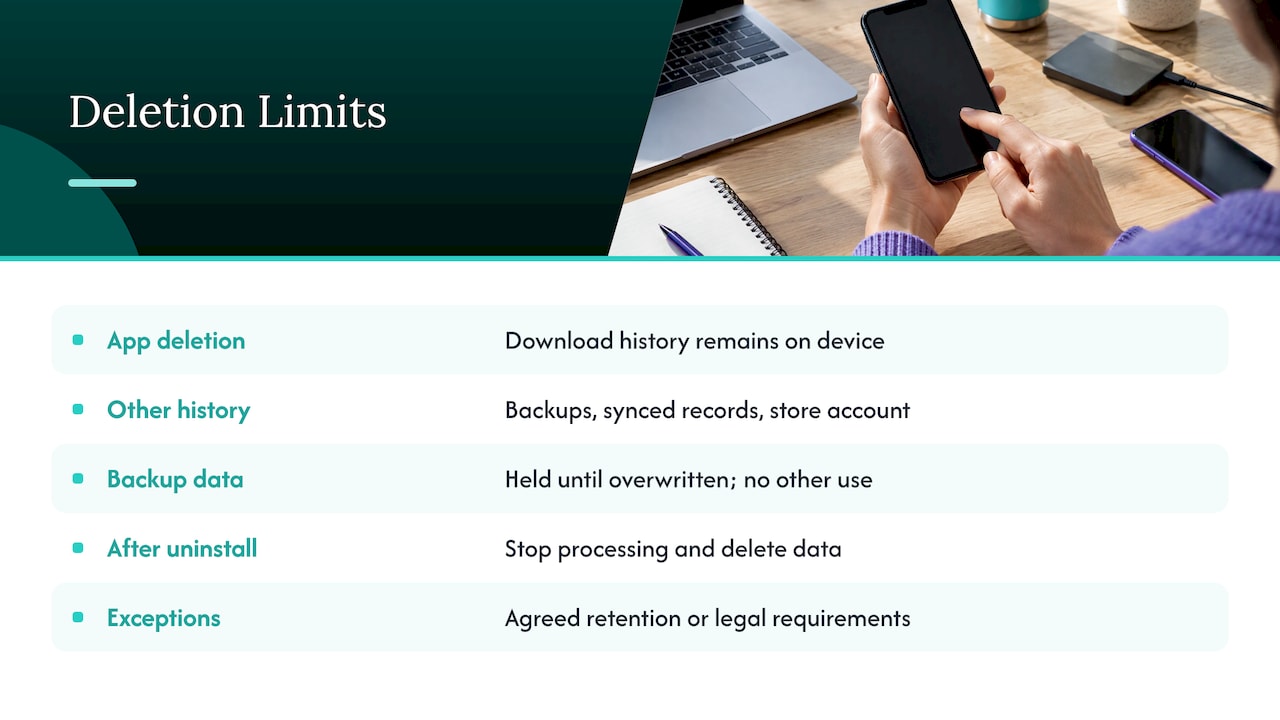
Deleting the app icon is not enough. The Safety Net Project points out that even after you delete an app, the download history remains on the device, in backups or synced records, and in your app store account.
On the company side, regulators accept that backups work differently from live systems. The UK Information Commissioner’s Office, for example, explains in its guidance on the right to erasure that data in a backup can be held until it is overwritten, as long as it is not used for any other purpose. Legal obligations can also require a company to keep some records. A good privacy policy explains this in plain terms.
The EU advisers state that, in principle, after you uninstall an app the developer no longer has a legal ground to keep processing your data and must delete it, unless you agreed to a defined extra retention period or the law requires retention.
Your privacy rights depend on where you live
The US has no single national privacy law covering every app, so your rights depend on your state and on the kind of data involved.
| Region | What you can do | Source |
|---|---|---|
| California | Ask a covered business to delete personal information it collected from you, with some exceptions; also ask to know, correct and opt out of sale or sharing | California Attorney General |
| United Kingdom | Ask for personal data to be erased under Article 17 of the UK GDPR | ICO guidance |
| European Union | Similar erasure right under Article 17 of the GDPR | EU advisers’ app opinion covers app retention |
Other US states have their own consumer privacy laws, and their details differ, so check your state attorney general’s website for what applies to you. Health apps have a federal angle too: the Federal Trade Commission updated its Health Breach Notification Rule in 2024 to clarify how breach notification applies to health apps and similar technologies. Because this area changes, confirm current requirements on the agency’s own site.
Even where no law forces a response, Google Play’s account deletion rule above applies to apps distributed there, so a deletion path should exist.
Our perspective
Safety apps ask people to trust them with something personal: where they are, who they call, whether they are okay today. We think the right way to earn that trust is to ask for less, not more.
That is why Well-Check is designed around simplicity and dignity. A one-tap “I’m okay” check-in, a contact network the user builds, and alerts that go to the people they chose. The aim is independence without surveillance: families get peace of mind, and the person living alone keeps control of their own day.
Features like GPS tracking and smart caregiver analysis are there to support that goal. We encourage every family to use them with the same habits we describe here: share location only as much as it helps, agree on who is in the network, and talk openly about what each person can see. Our guides on the three privacy nonnegotiables for senior GPS apps and privacy that protects dignity go deeper.
Brian
Setting up a safety app with privacy in mind
Whether you are a senior setting up your own app or a family member helping, this order works well:
- Install from the official store and read the permission prompts instead of tapping through them.
- Create a strong, unique passphrase and switch on multi-factor authentication if the app offers it.
- Choose the location setting deliberately. Start with “while using” and move up only if you need more. For short situations, temporary location sharing can mean one hour rather than forever.
- Build the contact list carefully. Three to five trusted people is usually enough; our guide to a verified emergency contact list explains how to choose and confirm them.
- Agree on etiquette. A short family conversation about who sees what prevents most conflicts. The six field agreement is a simple template.
- Set a calendar reminder to review app permissions and privacy settings every few months, since updates can change defaults.
Seniors have a say in all of this. An app used with consent and clear limits is more likely to be used consistently, and consistency is what makes a check-in system work.
Well-Check plans
Well-Check offers daily check-ins, medication reminders, missed check-in alerts to your emergency contacts, an emergency contact network, GPS tracking and smart caregiver analysis. The Essential plan is $5.99 per month and the Complete plan is $7.99 per month. You can compare them on our pricing plans page.
If you are setting up for a parent, start with the missed check-in protocol so everyone knows what happens when a check-in does not come.
FAQ
Where is the data from a safety app stored?
It can be on your phone, on the company’s servers, or with service providers the company uses, such as hosting or analytics. The privacy policy should say which. Data kept on the device gives you the most control, while data held remotely can be recovered if the phone is lost.
How do I ask a safety app to delete my data?
Look for an account deletion option in the app’s settings first. Google Play requires apps with accounts to offer one, plus a web link for requests. If you cannot find it, email the contact in the privacy policy with your account details and ask for written confirmation. California residents can cite the right to delete under the CCPA.
Is deleting the app from my phone enough?
No. Removing the app stops it running, but your account and the data tied to it can remain with the company. Download history can also remain in your device backups and app store account. Delete the account first, then uninstall the app.
Which permissions should a safety app need?
Only those that match features you use. Notifications are expected for check-in reminders, and location makes sense if you turn on GPS features. CISA advises extra care with contacts, camera, storage, location and microphone, and removing apps that ask for more than they need.
Can I use location sharing safely?
Yes, with limits. Allow location only while the app is in use where you can, share with people you trust, and review the setting regularly. Our guide on GPS tracking, privacy and consent covers the details.
Sources
- Privacy and Mobile Device Apps, CISA
- Protecting your information and data when using applications, Canadian Centre for Cyber Security
- Opinion on apps on smart devices, Article 29 Working Party
- How to manage your digital safety settings, eSafety Commissioner
- Getting Smart About Smartphones, California Attorney General
- California Consumer Privacy Act, California Attorney General
- Choosing and Using Apps: Considerations for Survivors, Safety Net Project
- Understand app privacy and security practices with Google Play’s Data safety section
- Right to erasure, UK Information Commissioner’s Office
- Updated FTC Health Breach Notification Rule, Federal Trade Commission